DrVoIP
  • Amazon Connect
    • Get Started
      • Why Amazon Connect
      • Deployment & Quickstart
      • Fixed-Fee Packages
      • Migration from Legacy Systems
      • DIY Call Center Kit
    • Grow & Support
      • Managed Service & Support
      • CRM Integrations
      • Pricing
      • Case Studies
      • Chatbot Design
    • Real Deployment
      • 40+ agents, one AWS Connect instance
  • AI Solutions
    • Smart Answer
      • Why AI Solutions
      • Knowledge AI (RAG)
      • AI-Assisted Agents
      • AI Readiness Checklist
      • Chatbot Design
    • Smart Action
      • Agentic Automation
      • AI in Amazon Connect
      • AI Modernization Brief
      • AI Performance Checklist
    • Applied AI
      • AI that answers, or AI that acts?
      • AI Insights & Analytics
  • Cloud Services
    • Infrastructure & Security
      • Why Cloud Services
      • Network & Security Hardening
      • Cloud & Virtualization Migration
    • Custom Engineering
      • Phone System Support & Maintenance
      • Custom Application & Integration Development
      • Chat, Messaging & Web Meetings
    • Client Result
      • Cloud engineering under the hood
  • About
    • About Peter
    • Resources
    • Blog
    • Contact
  • Book a Strategy Call
  • Menu Menu

ShoreTel Contact Center - Integrated Agent Tool Bar
Business Managers, Legacy Services, ShoreTel & Mitel, Technical Managers

ShoreTel Contact Center Agent Tool Bar
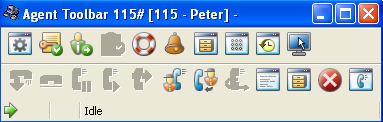
The ShoreTel Contact Center provides two strategies for call management at the desktop.   We have found that the basic 'agent tool bar' is an excellent solution for call center desktops in which different shifts sit at the same desk, use the same computer and phone.  It is easy enough to program the tool bar to prompt the agent for there log-in information.   In this way, you can set up your phones with extension numbers that multiple agents can use.  When an agent reports to work, they go to their assigned desk and log-in, using an extension that might have been used by a different Agent on the previous shift.  The ShoreTel Contact Center keeps track of what agent used what extension during what time slot.   On desks that are dedicated to an individual agent, the agent tool bar can be integrated into the ShoreTel Personal Call Manager.   The Personal Call Manager looks like a Workgroup Agent call manager, but the tool bar indicates "contact center" and the drop down list contains information that is appropriate to the ShoreTel Contact Center or Enterprise Contact Center.    There is one additional advantage of the stand alone Agent Tool bar.   You can push custom parameters, named "call profiles" in ShoreTel documentation, to the Agent Tool bar.  We find that you do not have the same flexibility with the Integrated Tool Bar inside the ShoreTel Personal Call Manager.
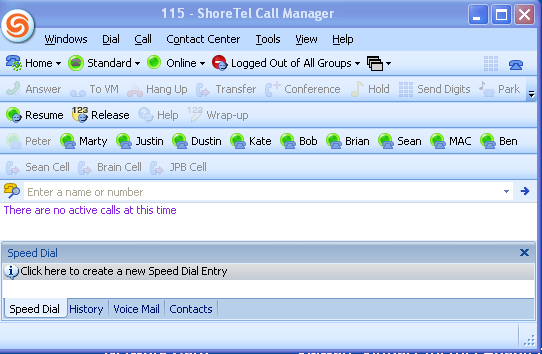

ShoreTel Personal Call Manager with Integrated Contact Center

April 13, 2009/by Peter
Tags: Agent Desktop, Agent Login, Personal Call Manager, Shared Workstations, ShoreTel ECC
/wp-content/uploads/2026/10/drvoip-logo-18.webp 0 0 Peter /wp-content/uploads/2026/10/drvoip-logo-18.webp Peter2009-04-13 12:08:032026-10-05 12:19:00ShoreTel Contact Center - Integrated Agent Tool Bar
You might also like
Contact center team photo collage Understanding ShoreTel Connect ECC Shifts!
Contact center terminology word cloud Deploy an Amazon Connect Contact Center for $195?
Helpful tips letter tiles How to create ShoreTel AA and ECC audio Files!
Helpful tips letter tiles Dextr adds Global Quick Connects for Amazon Call Centers!
Helpful tips letter tiles Preview ShoreTel ECC 5.1 Agent Tool Bar!
Helpful tips letter tiles Where is the ShoreTel ECC Query file?
Helpful tips letter tiles Route Points, IRN's and Media Streams!
Helpful tips letter tiles ShoreTel Abandoned Call Handling
DrVoIP logo

Building cloud communications and contact center solutions since 2008.

DrVoIP on YouTube
Peter Buswell on LinkedIn

Services

Amazon Connect
AI Solutions
Cloud Services
Case Studies

Company

About Peter
Resources
Blog
Contact

Talk to us

844-4DrVoIP
grace@drvoip.com

© 2026 DrVoIP. All rights reserved.

FAQsCookies PolicyPrivacy PolicyTerms of Use
Link to: Call Center Design Link to: Call Center Design Call Center Design Link to: ShoreTel compatible audio conference server? Link to: ShoreTel compatible audio conference server? ShoreTel compatible audio conference server?
Scroll to top Scroll to top Scroll to top

This site uses cookies. By continuing to browse the site, you are agreeing to our use of cookies.

Accept settingsHide notification onlySettings

Cookie and Privacy Settings


How we use cookies

We may request cookies to be set on your device. We use cookies to let us know when you visit our websites, how you interact with us, to enrich your user experience, and to customize your relationship with our website.

Click on the different category headings to find out more. You can also change some of your preferences. Note that blocking some types of cookies may impact your experience on our websites and the services we are able to offer.

Essential Website Cookies

These cookies are strictly necessary to provide you with services available through our website and to use some of its features.

Because these cookies are strictly necessary to deliver the website, refusing them will have impact how our site functions. You always can block or delete cookies by changing your browser settings and force blocking all cookies on this website. But this will always prompt you to accept/refuse cookies when revisiting our site.

We fully respect if you want to refuse cookies but to avoid asking you again and again kindly allow us to store a cookie for that. You are free to opt out any time or opt in for other cookies to get a better experience. If you refuse cookies we will remove all set cookies in our domain.

We provide you with a list of stored cookies on your computer in our domain so you can check what we stored. Due to security reasons we are not able to show or modify cookies from other domains. You can check these in your browser security settings.

Other external services

We also use different external services like Google Webfonts, Google Maps, and external Video providers. Since these providers may collect personal data like your IP address we allow you to block them here. Please be aware that this might heavily reduce the functionality and appearance of our site. Changes will take effect once you reload the page.

Google Webfont Settings:

Google Map Settings:

Google reCaptcha Settings:

Vimeo and Youtube video embeds:

Privacy Policy

You can read about our cookies and privacy settings in detail on our Privacy Policy Page.

Privacy Policy
Accept settingsHide notification only