A contact center can be changed in minutes. Recovering from a bad production change can take much longer.
Amazon Connect gives teams powerful APIs and infrastructure-as-code options, but a safe release process needs more than an upload script. It needs controlled environments, stable resource mappings, evidence-based approval, and a rollback path that protects live customer journeys.
DrVoIP has published a practical Amazon Connect CI/CD Pipeline Guide for engineering, cloud, and contact-center teams that want repeatable delivery without treating production like another development sandbox.
Why Amazon Connect delivery is different
Flows reference queues, prompts, Lambda functions, Lex aliases, flow modules, and other resources. Their IDs and ARNs change between Connect instances. Phone numbers, users, service quotas, channel registrations, and external endpoints may also be unique to an environment.
That means a reliable pipeline should promote intent rather than copy raw Development identifiers into Production. The guide recommends logical names plus an environment manifest that resolves each dependency in the target instance.
The release path
Store configuration in Git. Use pull requests and protected release branches.
Validate before deployment. Check flow syntax, references, hard-coded IDs, permissions, quotas, and destructive changes.
Deploy to Development. Run integration checks using non-production data.
Promote the same immutable artifact to Test/UAT. Replace only the environment mapping.
Pause for human approval. Review the change plan, test evidence, implementation window, and rollback reference.
Deploy Production in dependency order. Associate live phone numbers and channel entry points last.
CloudFormation, CDK, or APIs?
The right answer is often a deliberate combination. AWS CloudFormation now supports many AWS::Connect resource types. CloudFormation or CDK is a strong choice when the supported resource lifecycle matches the way the team wants to operate. Amazon Connect APIs remain important for migration workflows, coverage gaps, discovery, two-pass flow resolution, and controlled updates that need more precise orchestration.
The key is to assign one management owner to each resource. When two systems both believe they control the same queue, flow, or routing profile, drift becomes inevitable.
Save, validate, then publish
A flow should not become live simply because its JSON was accepted. A safer process updates candidate content, resolves required references, runs configuration and controlled contact tests, reviews the change report, and only then publishes the approved version. Keep the previously approved version available for fast recovery.
AWS has also announced the end of legacy flow-import support on March 31, 2026. Teams that maintain older offline exports should convert them to the current flow language before depending on them as a long-term source of truth.
Production approval is a feature
For a customer-facing contact center, a manual Production gate is prudent. AWS CodePipeline can stop at an approval action so an authorized reviewer can inspect release evidence before the pipeline continues. The approval package should show the commit, artifact checksum, resources created or changed, flow versions, tests, exceptions, maintenance window, and rollback reference.
This is continuous delivery: the release is ready to deploy, but a human makes the final Production decision.
Rollback without making the incident worse
Rollback should support a fast flow-version recovery and a broader release rollback. It should restore approved content, integration aliases, routing assignments, hours, quick connects, and channel associations as required.
Automatic deletion is a poor default. A newly created resource may already have contacts, reporting history, or other dependencies. Disable or quarantine first, investigate impact, and retire only through a reviewed plan.
What the downloadable guide includes
A reference architecture for Development, Test/UAT, approval, and Production
A 23-step implementation sequence
Logical-name and environment-manifest guidance
Cross-account roles, artifact encryption, and least-privilege controls
Validation, testing, release-manifest, drift, and audit recommendations
A Production readiness checklist
Current AWS reference links and the 2026 legacy-flow conversion notice
Download the DrVoIP Amazon Connect CI/CD Pipeline Guide and use it as the starting point for your release-design workshop. Email drvoip@drvoip.com to obtain this in depth guide!
If your team is ready to make Amazon Connect changes safer, faster, and easier to audit, contact DrVoIP. We can help design the pipeline, define the resource model, and build the tests and operating controls around it.
Executive summary: Amazon Bedrock, LangGraph, and CrewAI are not three competing versions of the same product. Amazon Bedrock supplies managed access to AI models and supporting services. Frameworks such as Strands Agents, LangGraph, and CrewAI determine how an AI application reasons, collaborates, uses tools, and moves through a process. Amazon Bedrock AgentCore can then provide the managed runtime and operational infrastructure needed to take many of those applications into production.
The right question is therefore not, “Which tool wins?” It is, “Which combination gives the business the control, security, recoverability, and accountability it will need after the demonstration is over?”
Production AI is usually a stack of complementary services—not a winner-take-all tool selection.
The Demo Is Not the Difficult Part
Building an AI demonstration has become remarkably fast. A small team can connect a model, add a few documents, call an external service, and produce something impressive before the coffee gets cold.
Production is where the adult questions arrive:
Who is allowed to ask the system to take an action?
Which customer or employee data can it access?
What happens when an external system is unavailable?
Can a transaction be resumed without starting over?
Which decisions require human approval?
Can the business explain what happened after an error?
How will quality, safety, latency, and cost be measured?
Who receives the 2:00 a.m. phone call?
That last question has ended more architectural debates than any benchmark ever will.
Start by Separating the Layers
Much of the confusion disappears when the technology is divided into layers.
1. Models and managed AI services
Amazon Bedrock provides managed access to foundation models and related capabilities such as knowledge bases and guardrails. It is the part of the stack that gives an organization governed access to AI models without operating the underlying model infrastructure.
Bedrock is therefore not a direct one-for-one replacement for LangGraph or CrewAI. Those products operate primarily at the application and orchestration layer.
2. Agent logic and orchestration
This layer determines how the application divides work, selects tools, maintains state, applies business rules, and involves people.
Strands Agents is an attractive AWS-first framework with agent, graph, workflow, and multi-agent patterns.
LangGraph is particularly strong when the process needs explicit states, checkpoints, controlled transitions, recovery, and human approvals.
CrewAI is appealing when the business problem is naturally described as a group of specialists working together toward an outcome.
Other frameworks or custom code may be appropriate when an organization already has established skills, intellectual property, integrations, or portability requirements.
3. Production runtime and agent infrastructure
Amazon Bedrock AgentCore is designed to provide managed production infrastructure for agents. Its capabilities include runtime, memory, identity, tool connectivity, observability, and evaluations.
Importantly, AgentCore is framework-agnostic. AWS documents support for agents built with Strands, LangGraph, CrewAI, Google ADK, the OpenAI Agents SDK, and custom implementations. In many architectures, AgentCore complements the selected framework instead of replacing it.
4. Deterministic business workflows
Not every business process should be placed under the control of an AI agent.
When a step must occur in an exact order, produce an auditable result, retry predictably, or follow a strict timeout, services such as AWS Step Functions and Amazon EventBridge are often better coordinators. The agent can contribute judgment where judgment is valuable while a deterministic workflow keeps control of the transaction.
In plain English: let AI interpret an unusual customer request; let conventional workflow automation make certain the refund is approved, recorded, and reconciled correctly.
When an AWS-First Stack Is the Sensible Default
An AWS-first design is compelling when the organization already operates primarily in AWS and wants to minimize the amount of infrastructure assembled from separate vendors.
A practical starting point is:
Models: Amazon Bedrock
Agent framework: Strands Agents
Runtime and agent infrastructure: Amazon Bedrock AgentCore
Retrieval: Bedrock Knowledge Bases, Amazon OpenSearch, or a specialized external data platform
Safety: Bedrock Guardrails
Identity: AWS Identity and Access Management together with AgentCore Identity
Monitoring and evaluation: AgentCore Observability and Evaluations, Amazon CloudWatch, and OpenTelemetry
Business workflow: Step Functions and EventBridge
This is not automatically the best design for every company. It is simply a coherent default: fewer operational seams, familiar security controls, consolidated accountability, and less infrastructure for the internal team to assemble.
It is the architectural equivalent of buying a coordinated kitchen rather than ordering the refrigerator, plumbing, cabinets, and electrical system from four companies that have never met.
When LangGraph Earns a Place
LangGraph deserves serious consideration when control over the execution path is central to the business requirement.
Examples include:
A transaction must pause for approval and resume later.
Every stage needs a durable checkpoint.
A failed step must be retried without repeating completed work.
The application requires explicit branches, loops, and exit conditions.
Operators need to inspect or alter state during execution.
The company wants detailed control over how long-running agent processes behave.
Consider a contract-review application. An AI model might identify unusual language, but legal approval must occur before the revised agreement is sent. The system may need to pause for two days and then resume from exactly the same point. That is the sort of requirement where durable state and human-in-the-loop controls matter far more than which framework produced the prettiest first demonstration.
LangGraph can still use models from Amazon Bedrock and can be deployed using AgentCore. Choosing LangGraph does not require abandoning an AWS-centered architecture.
When CrewAI Fits the Business Problem
CrewAI works well when business stakeholders already describe the process as a team of specialized roles.
For example, a marketing-content operation might include:
A research agent that gathers approved information
A product agent that verifies capabilities
A compliance agent that checks claims
An editor agent that assembles the final material
A supervisor that reviews whether the work is complete
That model is intuitive to business users because it resembles an organization. Roles, goals, tools, and assignments can be discussed without beginning the meeting with a diagram that looks like the New York subway map.
However, a good organizational metaphor does not eliminate production responsibilities. The implementation still needs identity, permissions, memory, data protection, evaluation, recovery, and monitoring. CrewAI can provide the collaboration pattern while AgentCore or another production platform supplies much of the operational foundation.
Choose the framework for the shape of the work, then choose the runtime and controls needed to operate it safely.
A Note About Amazon Bedrock Agents
AWS now refers to the earlier Amazon Bedrock Agents service as Amazon Bedrock Agents Classic. AWS documentation states that it is in maintenance mode and is not open to new customers. Existing customers can continue using it, but new designs should evaluate AgentCore and current AWS agent-building options before adopting an architecture centered on Agents Classic.
This is a useful reminder that production selection must account for product lifecycle as well as technical capability.
Use a Production Scorecard, Not a Demo Contest
Before selecting the stack, score each candidate against the following business requirements:
State: Can work pause, persist, and resume safely?
Security: Are identity, permissions, credentials, and data boundaries enforceable?
Recovery: What happens when a model, tool, or outside system fails?
Human control: Which decisions can be reviewed, edited, or rejected?
Evaluation: How will the company measure accuracy, safety, completion, and tool use?
Observability: Can operators trace what the system did and why?
Governance: Are changes reviewed, versioned, tested, and auditable?
Interoperability: Can models, tools, and data platforms be changed without rebuilding everything?
Cost: Can usage be attributed, forecast, limited, and explained?
Ownership: Does the company have—or can it obtain—the skills to operate the result?
The fastest demonstration may still win. It simply should not win by default.
The Practical Recommendation
For an organization already invested in AWS, begin by testing an AWS-first stack: Amazon Bedrock for models, Strands Agents for agent logic, AgentCore for the production runtime, and AWS workflow, identity, safety, and monitoring services around it.
Add LangGraph when durable execution, explicit state, or sophisticated approvals are defining requirements. Add CrewAI when role-based collaboration is the clearest and most maintainable representation of the work. Consider other frameworks when existing expertise, portability, specialized integrations, or product strategy justify them.
Most importantly, do not ask one tool to solve every layer. A model platform, an agent framework, and a production runtime have different jobs. The strongest implementation is often a thoughtfully governed combination.
DrVoIP can help your organization turn an AI use case into a production architecture—before a promising demonstration becomes an expensive collection of assumptions. Contact us to arrange an AI production-readiness and architecture review.
One of the most common questions we hear from clients building on AWS especially those exploring generative AI is which search service should I use? AWS offers four distinct search and query services, each optimized for fundamentally different problems. Choosing the wrong one adds cost, latency, and architectural complexity.
As an AWS Service Delivery Partner, DrVoIP works with organizations across verticals to design and implement cloud-native architectures. Here is our practical breakdown of when to use each service.
TL;DR: Use Athena for SQL analytics on S3. Use Kendra for enterprise document search. Use OpenSearch for real-time vector/hybrid search. Use Q Business when business users need a conversational assistant over corporate knowledge with minimal infrastructure.
Amazon Athena — Serverless SQL Over Your Data Lake
Athena is a serverless, interactive query service that uses standard SQL to analyze data directly in Amazon S3, using the AWS Glue Data Catalog as its metastore. You pay per query — there are no clusters to provision or manage.
Use Athena When
You need ad-hoc SQL analytics over structured or semi-structured data in S3 (Parquet, CSV, JSON, ORC)
You are analyzing AWS service logs — CloudTrail, VPC Flow Logs, ALB access logs
You need cost-effective batch reporting without standing up a data warehouse
You want to validate data quality or run ETL checks before loading into a downstream system
You are building BI dashboards via Amazon QuickSight
Do Not Use Athena When
You need sub-second query latency for real-time applications
Users are performing natural language or full-text search
Your workload requires vector similarity or semantic search
Kendra is a managed intelligent search service purpose-built for enterprise document retrieval. It uses ML models trained for reading comprehension to answer natural language questions over document corpora from SharePoint, Confluence, S3, Salesforce, and 40+ other sources.
Use Kendra When
Knowledge workers need Google-like search over internal documents
You need FAQ and question-answering over HR policies, legal documents, or technical manuals
Users ask natural language questions and expect direct answers, not just links
Compliance requires access-controlled document search with audit trails
Do Not Use Kendra When
You need vector/semantic similarity search at scale for a RAG application
Your data is structured rather than unstructured documents
You need real-time search over high-velocity data
Amazon OpenSearch Service — Developer-Grade Search and Analytics
OpenSearch is a managed, open-source search and analytics engine (forked from Elasticsearch). It supports full-text keyword search, vector search via the k-NN plugin, real-time log analytics, and hybrid search combining both. It is the go-to vector database for production RAG applications on AWS.
Use OpenSearch When
You are building a production RAG application and need a vector store with fine-grained control
You need hybrid search — combining BM25 keyword matching with semantic vector similarity
You are building an observability stack (replacement for ELK/Elastic)
Real-time log ingestion and analysis is required
You need reranking, metadata filtering, and custom relevance tuning
Do Not Use OpenSearch When
Your users are non-technical and need a simple conversational interface
You want a zero-configuration solution — OpenSearch requires operational investment
Amazon Q Business — Conversational GenAI for the Enterprise
Amazon Q Business is a fully managed generative AI assistant built on RAG principles. Connect your enterprise data sources and get a conversational interface immediately — without configuring embeddings, vector stores, or retrieval pipelines. It uses IAM Identity Center for access control, inheriting existing SSO group permissions automatically.
Use Q Business When
Business users need a conversational assistant over enterprise knowledge
IAM Identity Center is your SSO provider and you need per-user permission-aware responses
You want native connectors to Salesforce, Confluence, SharePoint, Jira, and S3 without custom ingestion code
Speed to deployment matters more than retrieval customization
Admin guardrails (topic blocking, response filtering) are needed without custom configuration
Do Not Use Q Business When
You need custom embedding models, chunking strategies, or hybrid search weight tuning
You are building a developer-facing API product rather than an end-user assistant
Per-user subscription pricing is prohibitive at your scale
Side-by-Side Comparison
Capability
Athena
Kendra
OpenSearch
Q Business
Primary User
Data Analyst
Knowledge Worker
Developer
Business User
Setup Complexity
Low–Med
Medium
High
Low
Search Type
SQL
NL Document
Vector / Keyword
NL Conversational
RAG Built-in
No
Partial
Manual
Yes — Native
Enterprise Connectors
No
40+
Custom only
40+
Vector / Semantic Search
No
No
Yes
Internal only
Hybrid Search (keyword + vector)
No
No
Yes
No
Real-time Log Analytics
Partial
No
Yes
No
Conversational UI
No
No
No
Yes — Native
IAM Identity Center SSO
No
Partial
Partial
Yes — Native
Pricing Model
Per query
Per index/query
Per instance/OCU
Per user/month
SQL Over S3
Yes
No
No
No
Customization Level
High
Medium
Very High
Low
Quick Decision Guide
SQL analytics over S3 data lakes or logs? → Amazon Athena
Business users searching internal documents? → Amazon Kendra or Q Business
Production RAG application needing vector search control? → Amazon OpenSearch Service
Conversational GenAI assistant for employees with SSO? → Amazon Q Business
Real-time log ingestion and observability dashboards? → Amazon OpenSearch Service
Hybrid keyword + semantic search with reranking? → Amazon OpenSearch Service
Enterprise search, no IT team to manage infrastructure? → Amazon Q Business
In the Context of Generative AI and RAG
As generative AI workloads become central to enterprise architecture, the search layer is the foundation of RAG pipeline quality. These services are not mutually exclusive. A sophisticated enterprise architecture might use OpenSearch for real-time customer-facing RAG, Q Business for internal employee knowledge, Kendra as the document index feeding Q Business, and Athena for analytics over all usage logs and evaluation results.
DrVoIP is an AWS Service Delivery Partner. We help organizations design and implement GenAI, RAG, and cloud-native architectures on AWS. Contact our team to discuss your architecture.
Rethinking Your Amazon Connect Contact Center: Start with the Experience, Not the Technology
When planning a new Amazon Connect contact center, the temptation is to jump straight into the technology — menus, routing profiles, integrations. But the truth is, great contact centers start with the caller’s journey, not the IVR script.
If your plan is to copy the same call tree you built a decade ago, you’re missing the opportunity to create a modern, frictionless customer experience. Today’s customers expect faster resolutions, smarter routing, and a personal touch — not endless menu options.
That’s where the DrVoIP Amazon Connect Planning Guide comes in. It walks you through the critical questions that must be answered before a single line of code is written or a design spec is handed to the implementation engineers. Questions about:
How will calls, chats, and messages be routed based on customer needs?
What self-service options make sense — and where should live agents step in?
How will you measure success from day one?
As an Amazon Certified Delivery Partner, DrVoIP brings the expertise to turn your vision into a contact center that’s on time, on budget, and delivering the highest customer satisfaction scores.
Want the full Planning Guide? We’re offering the DrVoIP Amazon Connect Planning Guide free of charge.
Ever feel like your website and call center are two ships passing in the night? One’s all flashy and interactive, the other’s stuck in a queue playing elevator music. Well, buckle up, because integrating them with Amazon Connect is like giving them a matchmaking app – sparks fly, efficiency soars, and your customers? They’re the ones getting the happy ending!
The Perks of Playing Matchmaker
Picture this: A customer lands on your site, browses your killer products, but hits a snag. Instead of rage-quitting to a competitor, they click a chat button and – poof! – instant help. No more “hold please” nightmares. With Amazon Connect, you get:
Seamless Chat Integration: Start with text-based chit-chat right on your site. It’s like whispering sweet nothings to your customers without the awkward small talk.
Escalation Shenanigans: Chat not cutting it? Escalate to voice, video, or even desktop sharing. Imagine screen-sharing a troubleshooting session – it’s like having a virtual IT genie pop out of your browser!
AI-Powered Wit: Our AWS Lex bots handle the basics, answering product queries with the charm of a stand-up comedian. “What’s the warranty on that widget?” Boom, answered faster than you can say “human agent.” Only escalate when things get real – saving time, money, and sanity.
The benefits? Happier customers who feel heard (literally), lower abandonment rates, and agents freed up for the tough stuff. It’s not just integration; it’s a full-on bromance between digital and human touchpoints.
How DrVoIP Makes the Magic Happen
At DrVoIP, we’re the wizards behind Amazon Connect deployments. We weave in AWS AI to make your Lex bot smarter than your average bear – or at least smarter than that one uncle who thinks he’s tech-savvy. From chat to video escalation, we ensure your setup is as smooth as a well-oiled meme machine. No more siloed systems; everything chats, calls, and collaborates like they’re at a family reunion (minus the drama).
Wrap It Up: Don’t Leave Your Site Hanging
Integrating your website with your call center via Amazon Connect isn’t just smart – it’s hilarious how much easier life gets. Customers get help without the hassle, your team avoids burnout, and your bottom line? It does a happy dance. Ready to play cupid? Demo by clicking the chat icon below or Hit us up at DrVoIP.com – we’ll connect the dots (and the calls)!
Amazon Connect was introduced in 2017 as a revolutionary, cloud-native contact center solution from AWS. That same year, DrVoIP installed its first Amazon Connect instance for a paying client. Having decades of experience building call center solutions with platforms like Cisco, we had developed a clear set of expectations for what a modern contact center should offer.
Initially, Amazon Connect lacked a native campaign dialer, a core requirement for outbound calling environments like telemarketing. This gap limited its early adoption in outbound-heavy verticals. While third-party integrations existed, our goal was to deliver a one-vendor solution built entirely on AWS.
Building with StartOutboundVoiceContact
In the absence of a native campaign dialer, early adopters had to get creative. The StartOutboundVoiceContact API enabled basic outbound calling, but required architects to develop extensive backend logic using Lambda, DynamoDB, API Gateway, and Connect flows.
DrVoIP built a foundational DIY dialer framework, managing contact lists, pacing logic, retries, and reporting through custom code. It worked—but was resource intensive and fragile under scale.
Third-Party Solutions Fill the Gap
As Amazon Connect gained traction, third-party dialer providers stepped in. Platforms from VoiceFoundry, Xaqt, and others offered robust outbound functionality, but came with additional costs, integration complexity, and vendor management burdens—contrary to AWS’s promise of simplicity and scalability.
The Arrival of Campaign Dialer V1
AWS quietly released Campaign Dialer V1, leveraging Amazon Pinpoint as the backend. It introduced basic campaign capabilities, including email, SMS, and voice. However, it suffered from major limitations:
No agent-aware dialing logic.
Lack of built-in retry policies.
Every contact was pushed to Customer Profiles, bloating CRM databases with unqualified leads.
Minimal real-time reporting or call disposition visibility.
V1 was a step forward, but it wasn’t production-grade for enterprise outbound needs.
In part 1 of this blog we looked at three options that enable an Agent to make originate an SMS message:
Option 1 – User a TASK Template
Option 2 – Create an HTML Form (DrVoIP favors this approach)
Option 3 – Create an Email to SMS solution
The key flows in any of these solutions, is to write the Send_TO_Number, smsMessageContent, AgentID (extension number, login, username), and timeStamp to a dynamodb table when originating and outbound SMS. This is possible with all three solutions, but we like option 2 the best. Option 1, with all of its strangeness has the advantage of being an action taken within the contact center, making a historical record more practical. The other two options, start outside the call center and the origination event is not noted for historical records in the out of box archive methodology of the Amazon Connect Instance.
Option 1 Task Template launches Contact Flow
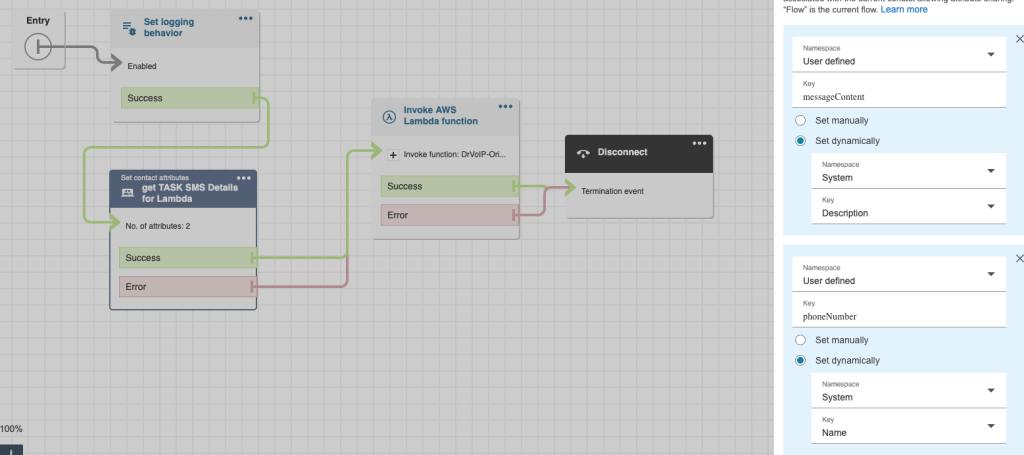
The TASK solution gets the Origination SMS job done and works just fine. The Contact Flow the TASK points to contains an invoke Lambda that sends the messageContent and phoneNumber on to Pinpoint SMS. There is no real way however, to capture the Agent that initialized the Task. We tried writing the phoneNumber and TaskID along with a timestamp to a dynamoDB table, then invoking another lambda to look up the phoneNumber it in an inbound contact flow, but it was just ugly and did not identify the agent that originated the outbound SMS. You need someway to ID the Agent so you can “set working queue” by agent and get the incoming return message routed accordingly. Given that custom fields (as of this blog) can not be passed as a contact attribute, there was not way to add the Agent ID to the Task Template.
Another major challenge is that the CHAT API used by SMS (and chat for that matter) does not, in general, support Contact Attributes. Let us assume you want to ask the customer to enter the order number so you can look up the status. They might provide that number, but there is no way to extract that data and assign it to a Contact Attribute for further processing later in the contact flow.
Enter Option 2 (Static website to launch HTML form)
The benefit of popping an HTML form is that you can prompt the Agent to enter something to identify themselves. This would enable you to invoke a lambda function to write the phoneNumber, AgentId and timestamp and even the smsMessgeContent to a dynamoDB table for later processing. That function would also include the SDK that enables you to find the agents unique ID and also route that to the database. The entire DB item would include:
customerNumber – this would become the partition key in your dynamodb table;
smsMessageContent – the text of the outbound SMS message content;
agentID – obtained by using the Agent username and the SDK to get the agentId a unique value for each agent.
timeStamp – date and time of the item creation.
The inbound contact flow handler we could grab the Customer Number, invoke a lambda function to request the agentId so that the chat session (i.e. SMS) could be routed to the agent that originated the outbound message using the “Set Working Queue by Agent” step in the contact flow associated with the SMS number. We would also invoke a lambda function to retrieve the smsMessageContent from the stored item and assign it to a contact attribute for later use. (Developer Note: It would be possible to retrieve both the agentId and the smsMessageContent in one invocation, but parsing a JSON object in a contact flow is not worth the trouble, it is easier to make two invocations).
When the agent accepted the incoming chat, the ongoing back and forth of the chat transcript (i.e. SMS) would be captured and stored. How would the agent know what the original outbound message contained? We need a strategy for presenting that to the agent and adding it to the transcript for historical reporting, or additional processing by LENS etc. Using the Agent whisper function, we would use the contact attribute created for smsMessageContent to satisfy this requirement.
This option, in our opinion, is the optimal solution for originating an outbound SMS message and routing the return message to the agent who created the message in the first instance. It captures all the activity, makes it available to the agent and other features of the Amazon Connecct instance.
Enter option 3 Email to SMS
In this option we want to use email to launch the SMS handler using the configuration provided in Part 1. The thinking here was to use SNS rather to trigger a Lambda rather than Invoking Lambda from inside a contact flow triggered by the Chat API. Do not connect the SMS phone number direct;y to the Instance. We created two SMS handlers: one inbound Lambda to handle either an SMS that did not ordinate by an Agent. it could also handle a return message originated by an Agent.
Email Outbound
Using the email client we were able to launch an outbound lambda that would be able to parse the message and write the From (i.e. Agent ID), Subject (i.e. target recipient phone number)and a times stamp to a dynamoDB table. No need to log the message content, we would pass all the variables off to the Pinpoint SMS number.
SMS Inbound
The inbound SMS triggered the lambda which would use the phone number to index the dynamoDB table and bring back the AgentId. It might be necessary to use the AgentId to look up the Agent Name or ARN, but the result was much cleaner and seemed to work just fine! With the AgentId we were If there was no matching number in the database then the message was treated as a new incoming SMS and routed to the default workgroup set in the contact flow.
TTL
We needed a ‘garbage collector’ that could go into Dynamodb and clean out any entries that had a time stamp that exceeded whatever we set as the Time To Live (TTL) value.
Transforming Customer Service with Visual Interaction
In April 2022, we introduced our first blog and demo showcasing the integration of video into call centers using Amazon Connect. Since then, the potential applications for video in customer service have continued to expand across various industry segments where “high touch” customer contact is crucial. Initially, we focused on applications that added video as a chat option, connecting website visitors to customer service representatives in contact centers. However, the practicality of video solutions has significantly increased with the advent of mobile smartphones as customer endpoints.
Enhancing Customer Service with Visual Interaction
Imagine an insurance adjuster dramatically increasing the number of claims they can process. Instead of visiting each claim site, a video conference enables the agent to visually inspect damages remotely, streamlining the claims process. Similarly, many technical support issues could be resolved in a single call with video support. For instance, an agent can ask, “Can you show me exactly which port you plugged that cable into?” This visual interaction can lead to quicker and more accurate resolutions.
Telemedicine: Revolutionizing Healthcare
Telemedicine is another powerful application of video integration in contact centers. Healthcare providers can offer virtual consultations, allowing patients to receive medical advice and care from the comfort of their homes. Video consultations enable doctors to visually assess patients, discuss symptoms in real-time, and even guide them through minor procedures or exercises. This not only improves patient convenience but also expands access to healthcare services, particularly for those in remote or underserved areas.
Real-Time Product Demonstrations
In retail, video can elevate the customer experience by enabling real-time product demonstrations. Customers can connect with a representative who can showcase products, answer questions, and provide personalized recommendations. This interactive approach can enhance customer satisfaction and drive sales, as customers gain a better understanding of products before making a purchase.
Virtual Property Tours
The real estate industry can also benefit from video integration. Real estate agents can conduct virtual property tours, allowing potential buyers or renters to explore homes and apartments without physically visiting the location. This not only saves time for both agents and clients but also broadens the reach of property listings to a global audience.
Personalized Financial Advice
Financial institutions can leverage video to offer personalized financial advice. Clients can have face-to-face meetings with financial advisors to discuss investments, savings plans, and other financial matters. This personal touch can build trust and strengthen client relationships, ultimately enhancing customer loyalty.
Education and Training
In the education sector, video can facilitate remote learning and training sessions. Instructors can conduct live classes, workshops, and one-on-one tutoring sessions, ensuring students receive the support they need regardless of their location. This can be particularly valuable for professional development and corporate training programs.
There is a YouTube Demo click Pic!
Conclusion
Consumers have increasingly adopted video conferencing, especially since the release of camera-embedded phones. By integrating video into your contact center, you can enhance the clarity and effectiveness of customer interactions. Whether it’s resolving technical issues, processing insurance claims, offering telemedicine services, conducting virtual tours, providing financial advice, or delivering education and training, video can transform customer service experiences.
Embrace the power of video with Amazon Connect and take your customer service to the next level.
For several years we have been deploying a modified version of the Amazon Connect Voice Mail solution as published by the AWS team to GitHub! When Amazon Connect first hit the market in 2017, it was without a voice mail solution. Actually it was without lots of features that most call center folks would expect! However, as time unfolds in its petty pace, new features are regularly being added. Today, Amazon Connect continues to lead the way in call center technology. The voice mail solution, has changed over the last few years, and though in January of 2024, AWS archived the application and no longer supports it, the solution is still quite useable with a few tweaks. AWS indicates they are rewriting the solution, but they have not published a target release date.
Dial Agent Direct Option
We have modified the solution in a variety of ways. For example, many folks want a caller to be able to dial an extension number to reach an agent directly. We created contact flows to do just that and we rely heavily on the published solution. You can dial an extension, if the Agent is not available, you can leave a message or transfer off to another agent or customer service queue. Messages can be transcribed and sent via email or as an SMS message. Given that you can not “transfer to flow” from within a customer queue hold flow, we build the voice processing option into the hold flow. In this way you can offer your customers waiting for an agent to become available options that include leave a voice mail. The voice mail, taken in a customer service queue, can be routed like a phone call to the next available agent as a task.
The voice messaging framework opens up a range of new functionality for the Amazon Connect instance! Let us know if we can help, just email drvop@drvoip.com and we will get you pointed in the right direction. There is a YouTube video on this configuration:



 Imagine an insurance adjuster dramatically increasing the number of claims they can process. Instead of visiting each claim site, a video conference enables the agent to visually inspect damages remotely, streamlining the claims process. Similarly, many technical support issues could be resolved in a single call with video support. For instance, an agent can ask, “Can you show me exactly which port you plugged that cable into?” This visual interaction can lead to quicker and more accurate resolutions.