The ShoreTel Prefix Option

In this economy, there are a growing number of mergers and acquisitions, or “marriage by shotgun”. When companies combine they have the challenge of integrating their data and telecommunications systems. For example, we have witnessed an increased demand in companies seeking technical assistance in merging ShoreTel systems. There are two basic options for doing this and the choice often depends on resource requirements and “dial plan” conflicts. To illustrate these options let’s assume Company A merges with Company B. Both companies desire the integration of their telephone systems if for no other reason than to enable the extension to extension dialing.

The first option is the traditional single image option. Assume that Company A will become the HQ Server and the other Company B will become the DVM server. To accomplish this, the database of Company B will be manually imported to the HQ server and a new site is created. ( Clearly, the WAN solution is in place and connectivity between the two companies exists). When you complete the database additions to the HQ server, adding all the new users, switches, workgroups, hunt groups and site details you are ready to convert the Company B HQ server to a DVM. You are going to have to reconfigure the site switches to point to the new Company A HQ server, but the process is manageable and you should achieve the desired result with limited downtime.

The second option is less obvious and many ShoreTel field installation technicians will not be familiar with the option. Out of the box, ShoreTel supports site based Prefix Dialing. In our example, we would leave both Company A and Company B with a HQ server. They would appear to be two separate systems. The use of the Prefix dialing, however, makes it possible to enable the extension to extension dialing between the systems. Through the ShorewareDirector web portal, you would select the Dialing Plan from System Parameters. The dialing plan would enable you to select a digit for extension dialing, with from 1-7 prefix digits. In our small example, we might make use of Digit 7 with a prefix of 2 digits, allowing us to create 99 sites.

When you exercise this option, you will see a new field appear in the SITES definition in the ShorewareDirector portal. Entitled “Extension Prefix” the field enables you to assign a two-digit SITE ID to each site you create. As you assign users to SITES, their extension numbers become the SITE ID + Extension number. Given that we have a WAN solution in place, we can then establish SIP Tie Trunks between Company A and Company B. The Trunk Group that defines the TIE LINE would have an OPX (off premise extension ) list that defines the extension range that “lives” at the other end of the TIE line. Company A might have a prefix of 77 and Company B might have a prefix of 78. Users in each system, even though they were previously defined with a three digit “dial plan” would now show 77-123 or 78-123 when you reviewed their individual USER configuration in Shoreware Director. Assume further, that both companies had similar “dial plans” meaning that they had the same extensions assigned in both companies! The extension prefix option working as a site ID, enables both companies to keep their extension numbers.  From within your site, you only dial the extension digits.   You dial the prefix digits + extension number to reach someone in a different site.
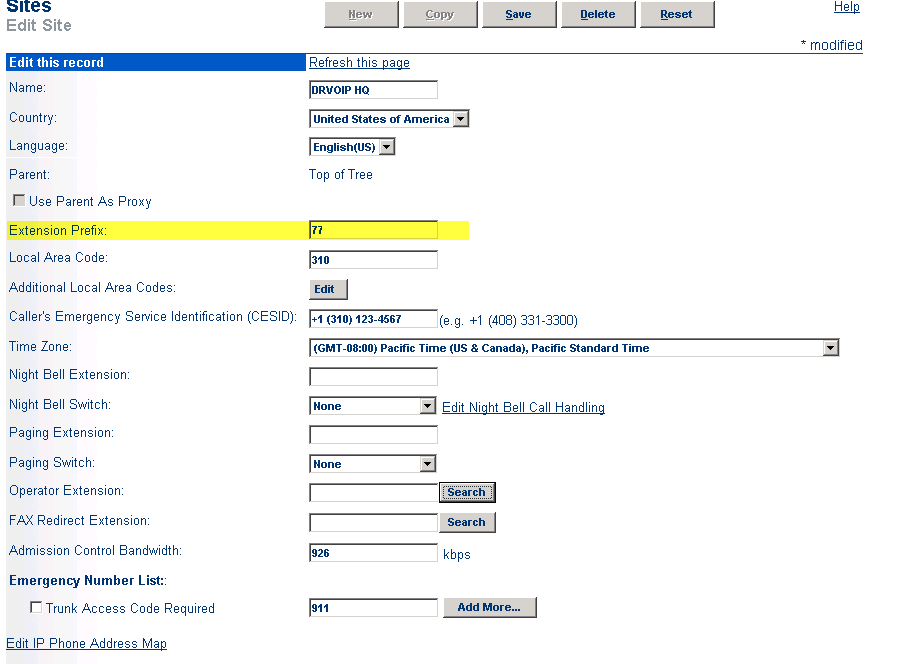
site-id1

Arguments can be for, or against either option.A single image solution has real advantages in that there is a single point of administration and a single VM system.Others would argue that redundancy and increased resources favor the second option.Remember that currently, ShoreTel “Workgroups” are not a distributed service.The second option enables some workgroup survivability given an HQ server failure. Prefix dialing has a place in the integration of independent systems and can work to reduce HQ server work load while increasing resources and mitigating dial plan conflicts.

More on ShoreTel LLDP – follow up to previous blog post!

This is a follow up post to an earlier post on LLDP-MED. VoIP phones on the market today follow the same basic boot and operations process:

1 – Wait for an LLDP packet from the Ethernet switch

2- Send a DHCP discovery packet to find the DHCP Server

3- Send a DHCP request to the DHCP server to get an IP address

4- Send an LLDP-MED packet to the Ethernet switch

5- Wait for an LLDP-MED packet from the Ethernet switch and read the Network Policy TLV to get the VLAN ID, L2 priority and DSCP value

6 – Download applciations and software from the “call manager”

7 – After configuration , voice packets are sent as tagged frames and data packets are sent as untagged frames

The ShoreTel implementation of LLDP seems to follow this process only after step 5, the result of the IP Phone learning LLDP by having its firmware configured. In other words, a phone out of the box is a hung of iron with no inherent ability to define itself as an IP phone to an LLDP enabled ethernet switch. The ShoreTel phone will still require an intial boot in the native VLAN and then reboot in the voice vlan, where it will then download its firmware. The real value here, is that once this process is “learned” by the ShoreTel phone, should the phone restart for any reason in the future, it can start at step one above. LLDP in ShoreTel is a version 9.1 feature enhancement not available in earlier releases of ShoreTel.

update 2/15 see  article at Support.DrVoIP.com

How to cause a ShoreTel phone to dial from within Outlook

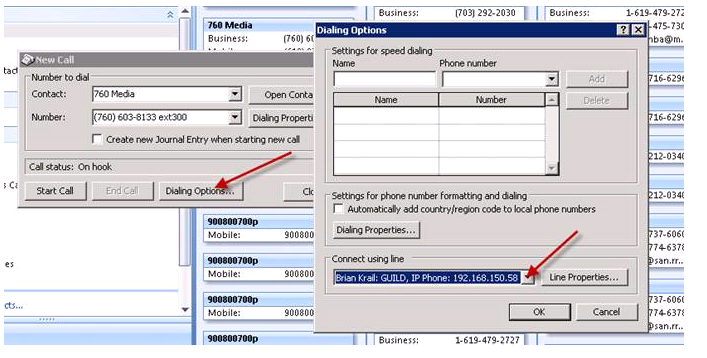
We see a lot of request that can be summarized as   “can we dial from within<(insert your favorite application here>?   Outlook, for example, has an ability to let you select the ShoreTel TAPI line so that you can dial from a Contact.  Here is how you set it up.  First, in the tool bar of the Outlook Contact, you should  see a PHONE ICON.  Selec the Icon to open configuration options:

Outlook Tool BarThe select the “Dialing Options”.  In the new box that opens, you will see a drop down box that allows you to select the ShoreTel  TAPI line with Outlook should use to dial  (this would be the same for any other applicaton that supports TAPI based dialing).

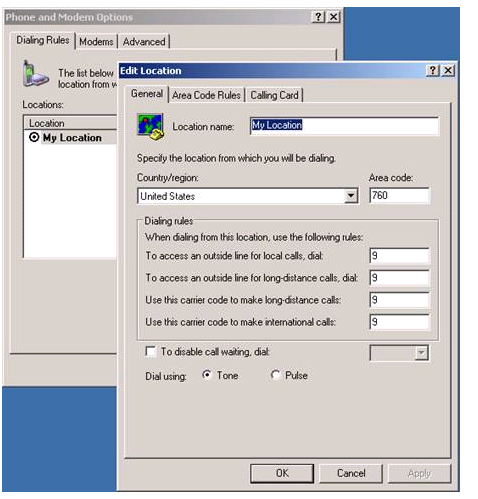
Select TAPI lineIf you see the call is attempted but fails, you may need to check the “Phone and Modem Options” in the Microsoft Control Panel to ensure the system is setup for the appropriate area code and Trunk Access code.

Phone and Modem OptionsOther than that, there are no other settings and the ShoreTel should “smile and dial”!

How to Telnet into a ShoreTel phone

A typical trouble ticket might sound like “when another extension calls me, I can hear them, but they can not hear me”!  Actually, one of my personal faviroites.  Over the years I have come to learn that this is usually the result of one of two issues: someone has the wrong default gateway; or port 5004 is being blocked by some firewall in one direction.  As we move more and more toward SIP and media streams move away from a dedicated port, this issue is almost always a network configuration error.

So which device has the wrong default gateway?   That takes some dedective work.   Generally you will telnet into the ShoreTel SG media gateways and check the configurations.   Media stream between phones generally do not need an SG switch beyound call setup.  The media stream, once the call is setup, is between the two phones.   For this reason, you will want to tenet into the phone and “see” the network from the phone’s percepective!   To do this, you will need to know the ShoreTel methodology and process.

Security on the SG switches and phone, requires that you start the process from the ShoreTel HQ server.   There is a specific subdirectory that you need to be in to launch the various utilities.  This silent viedo walks you through the process of using one utility, phoneCTL, to telenet into a phone and look around.

Switch Connectivity Diagnostic

Most ShoreTel System Administrators learn early on that the “Quick Look” link in the ShoreWare Director is your best friend! After all, telephony trouble indications are easy to spot: Green is good, Red is Bad and yellow means “something needs attention”. At the first report of a trouble indication, a System Administrator will bring up a browser and get to the log in screen of the Shoreware Director portal. Quick Look, Under the Maintenance section of the administrator portal, provides an immediate snapshot of what is going on in the system. If you see any RED at the HQ level, you can drill down and find the site and switch that might be the source of your problem.

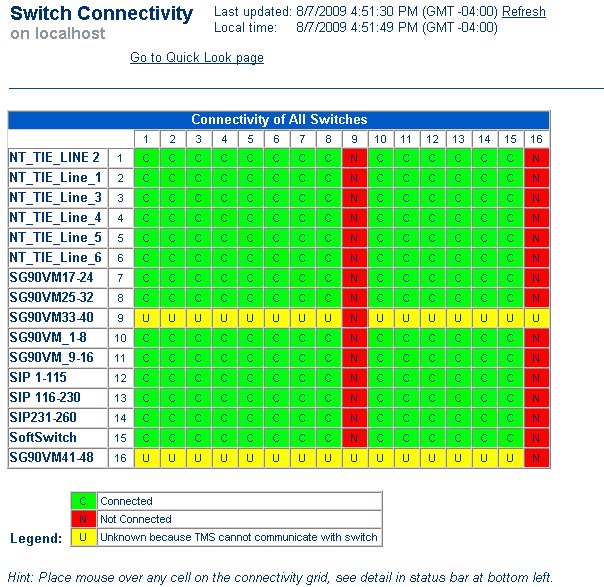
What happens when you look and you see Green?All is good!Why am I getting user reports of inability to complete a phone call?The very best next step for you to take is to click on the Switch Connectivity link under the same Maintenance section as Quick Look.The switch connectivity screen will illustrate any connectivity issues between switches on the network. It is very possible that the HQ server “sees” all is well and reports Green, but individual switches served by DVM’s, for example, do not see each other.By pinpointing the intersection of switches that can not communicate with each other, you will generally find a network or default gateway issue that is causing your negative user reports!As useful as the Quick Look may be, the Switch Connectivity page is a more useful diagnostic for locating network based issues.

switch-connectivityFor more detailed information about a switch, place the mouse cursor over the connectivity cell in question and status information will be displayed in the status bar at the bottom of your browser!  Green is Still Good and indicates the Switch is communicating with the other switches in the system.  Yesllo indicates that the switch connectivity is unknown because it can not communicate with TMS and RED indicates a complete loss of communications with the server!

The missing ShoreTel Beep!

In both ShoreTel Release 8 and 9 there is a very interesting behavior that will ultimately bring a client call to your support center.   The behavior is most obvious in a multi-site deployment in which there is only one HQ server providing voice mail services.    A call to a user at a remote site is RNA (i.e. ring no answer) transferred to the voice mail system.   The call entered the system on a PRI at the remote site and is then transferred across an MPLS WAN to the HQ server.   The caller hears the greeting: “I am not here, at the beep please leave a message”.   The caller dutifully waits for the “beep”, but it never comes.  What happens to it?

The fact of the matter is the “beep” was in fact played, but the caller did not hear it.   This has to do with the use of the G729 Codec on Inter site calls in this scenario.   The G729 is distorted to the point that the caller can not hear the beep.   The distortion appears to only be related to the implementation of the G.729 codec on the virtual soft switch.  As a troubleshooting step, I used a different phone system and an IP phone that was set to only use G.729.  When we called the HQ virtual soft switch over a local PRI trunk where ULAW was being used from the PRI switch to the HQ server, we heard the voicemail beep without distortion (through the G.729 codec as implemented on a different PBX).  It is only distorted when the virtual soft switch is trying to do G.729.

Outlined below are two WAV files of the normal beep (ULAW) and the distorted beep (Softswitch G.729).  We have also attached a visual representation of the audio files.  The distortion is audibly and visibly clear.  Our thinking is the “beep” is to short and to high a frequency, but we are not developers!  Currently, the only known fix for this is to change the Codec to G711.  That fixes the issue, but it may have a negative impact on your WAN plan!  I am sure there is a fix in the works back at the ShoreTel Mother ship, but we have not seen it yet.

waveforms

V Switch Schedule does not change Automated Attendant?

This is one of those trouble tickets that keeps an engineer awake at night. A V switch was installed at a remote site to provide Automated Attendant and Voice Mail services for that site.   The V switch was one of three switches at that site and each switch had analog CO lines connected.   For reasons that nobody could explain, the observed behavior was that the AA would not change from On Hours to Off Hours as scheduled. An observed behavior, does not really state the problem!  (read: lesson learned) What we learned is that the AA did in fact actually change per the schedule, but only the lines connected to the two other non V switches received the correct prompt per the schedule.   The CO lines connected to the V switch, (which included the main number and next three lines in hunt, but of course) ,  did not get the correct AA greeting.    Now, as nightmares go, this was about as difficult as they get when you are attempting to distill a problem statement.   As everyone called the main line,  everyone thought the AA was not changing per schedule.   Only by calling lines not terminated on the V switch did the real problem statement emerge.

ShoreTel has now assigned a known defect number to this behavior. “The issue you are experiencing has been addressed in defect 1-34192469.  The defect has been corrected and is pending a patch release.   Once the patch release hits our QA group for testing and validation, we will be able to provide a rough estimate on a release date”.

I could have listened to my mother and finished law school, but no.  I wanted to be a telecom entrepreneur ……

Analog lines in the 21st Century?

Getting old is a pain in the neck!   Literally and figuratively!  I am trying to figure out the benefits of getting older and I am not coming up with a very long list.    You built a library of experience, I guess that must count for something.   There is new generation of telecom professionals that have no idea what a cross bar switch is, but so what.   Nobody is really missing buggy wips either.   In the old “Bell System”  (I have really dated myself now, as google demographics tell me my readers were born post breakup) there was a specific regulation against the interconnection of analog telephone lines on an PBX.  Now part of that restriction was the Bell System being a bunch of anti-competitive jerks, but there were also real technical issues for not doing so.   Analog lines are most useful in man to man communication.   The issue here is the concept of “answer supervision” and “calling or callED party disconnect”.   

When you answer the ringing phone in your house, the answer supervision is actually your ear.   You can “hear” the other party.  yes, there is a line reversal or voltage change but being a two wire loop is nothing like being a trunk line.   For that reason we use trunks to interconnect machines to machines.   Every go to make an outside phone call, and find someone on the line?   Great example of “glare” the concept of a call ringing in just as you where grabbing it to make an outside call.   Analog lines are good for key systems with winking and blinking line keys that show everyone who is on what line, but they are a real annoyance on a PBX system.

Answer supervision is poor if it exists at all and glare can be a real issue.   Throw a couple of Centrex lines in the mix and you will get some real extra fun features.  Nothing like having analog lines connected to your PBX that have feature treatments you did not know about.   It is always phone when the phone companies VM picks up before your ShoreTel VM system does!  As a rule you might like to have one analog line at a site for 911 and power failure, but the idea of running a ShoreTel PBX with a rack full of analog lines, actually makes me ill.   Judas Grunt,  it is the 21st century already!   Can you spell SIP?

ShoreTel does a reasonably good job with analog lines given the real disadvantage they have in the area of answer supervision, etc.   ShoreTel actually goes off hook on these lines at timed intervals.  If it does not “hear” dial tone, it marks the line out of service.  If you are really cleaver, there is a trick to recording the sound made when the line goes “off-hook” so you can retrieve the wav file and play it back locally.  A great life saver when you are in Portland and your trouble shooting a local loop in a remote site, just outside Minute, ND and nobody is in the office.

It amazes me that we still have analog lines on PBX systems, but as long as we do, we might as well learn how to deal with them.

Does the ShoreTel Server Stream Media at G711?

You have dutifully enable Differential Service Control Points on you WAN network, to enable EF for voice traffic!  This is the minimum daily adult requirement for QOS on a WAN connection.   Prior to Version 9+ ShoreTel did not mark all traffic with a DSCP value, only media traffic between end points.   If you think this through, what happens to the media stream played out by the ShoreTel server during Automated Attendant of Voice Mail use?  Would this media stream across the WAN using the inter-site codec setting, typically a G.729 vocoder?  Or would it stream at G.711?   Given that there is no DSCP value on this media stream, that might be a QOS problem across a WAN connection.   Would it be possible to set up a  MATC H for the source IP address of the ShoreTel Server and through these IP packets into the EF queue?

To improve this situation, ShoreTel enabled “media proxy” on the Fuji or full size 19” switches that have been shipping prior to Version 7.    In this configuration, if a caller across the WAN reached an extension at another site, and that extension RNA forwarded to the VM system, the media stream would be have different end points.  At first you would think that the media stream would be between the originating extension and the Voice Mail server, but it is not.  It is in fact, between the originating extension and a switch at the HQ site (one of the reasons you always need a switch at the HQ site).  A switch at the HQ site would then proxy the media stream to the VM server, transcoding G.711 and G.729 to assure the correct vocoder across the WAN.   In this way the, the source IP address of the server is irrelavent for QOS purposes!

Now with the introduction of the ½ size switches, this is no longer the case.  Apparently with the release of 7+ the server is capable of streaming G.729.   So we need to be aware that an installation using the new switches, will no longer proxy for the VM media stream.    Additionally, there is a requirement that you set the number of media streams that can be transcoded at any one time.   This setting is in the registry of the ShoreTel Server and should look something like this:

Path: HKEY_LOCAL_MACHINE\SOFTWARE\Shoreline Teleworks\TDIMedia

Key: MaxNoOfG729Channels

Type: DWORD

Default Value: 40

This setting is suppose to be enabled on versions 7+, but if you are upgrading you may have to create and set it manually.    Clearly, optimizing your WAN for QOS is an essential element of providing toll quality voice on any VoIP solution.   Knowing what is class marked with DSCP and what is not, is an important element of achieving the desired result.   Check this issue carefully!

Memorial Day and ShoreTel Holiday Greetings Schedules!

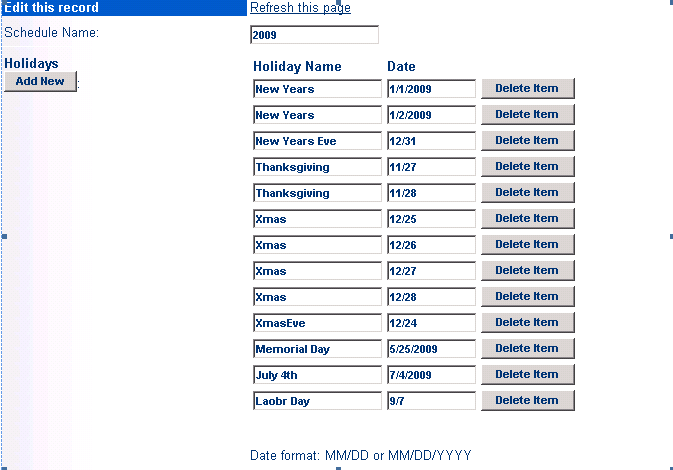
It happens every year, every holiday at exactly the same time.  Usually, at 4PM the day before the “holiday” that everyone know was coming, your entire client base calls to ask you how to change the Automated Attendant for a holiday greeting!  One of the features that every ShoreTel System Administrator truly appreciates is a fully automagic Automated Attendant! The means it knows when it is a holiday and it changes the greeting automatically!  ShoreTel does a really great job with this feature. You can set up your entire holiday schedule for the year and then forget about it. Each Automated Attendant can have a schedule applied to it that can even include Custom or half days.  You can record a generic holiday greeting:  “You have reached at a time when we are close for the holiday”, which saves you the effort of having to record a special greeting for each holiday, but the schedule can automate the entire process and save your service organization a lot of time repeating the programming instructions!  In fact, we have recorded the instructions we have given them so often.  We have an automated holiday greeting that says “press 1 if you are calling to learn how to change your holiday greeting”!

Have a great Memorial Day holiday and remember that this is weekend is not all about life at the beach.   Memorial day is the day we honor those who did not come home;  those who gave their life in the service of their country so that we could enjoy the tremendous benefits of living in America.

ShoreTel holiday schedule