Amazon Connect CRM Integrations and Custom Phone (CCP)

Call Center Integration

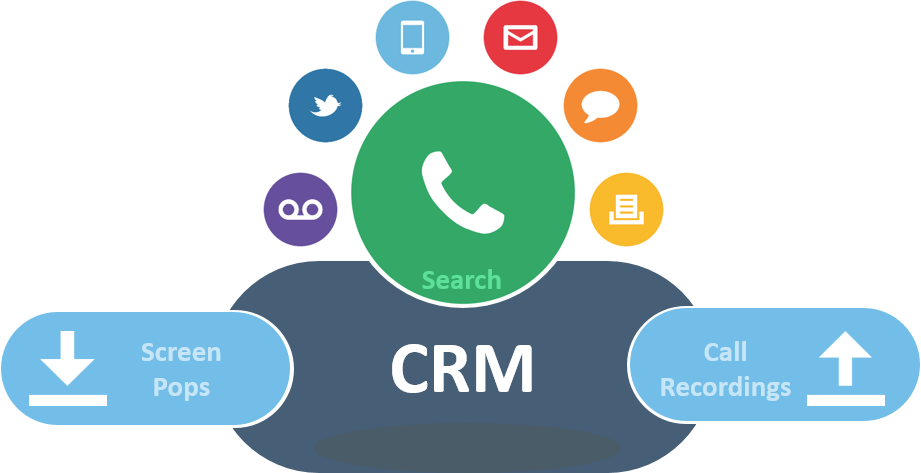
It is rare to find a call center that does not have an integration requirement.  Sometimes the integration is with a popular CRM package like SalesForce, ZoHo, FreshDesk or SugarCRM.   Sometimes the integration request is for some internal Intra-net accessible database unique to the client and their work process.  In all cases, we still have to have an Agent interface to manipulate the telephone and that is where building a customized CCP or softphone interface becomes necessary.    There are multiple ways to do this, but the simplest way is to create a marriage of the data sources in a single webpage served up by a simple website. basic Integration Concepts

The most popular requests are to “pop” a customer record on incoming phone call.  Which Customer record?  Well we can take the incoming caller ID, the number dialed (i.e. DNIS) or prompt the caller to enter some information that could be used to uniquely identify the caller.  Caller ID can be helpful, but more times than note it is wrong.   The contact record in your database might list the callers main company phone number, but they are calling using their cell phone or a DID number within the internals of the company.  For this reason it is always more accurate to prompt the caller to enter an account number, or ticket number.  The system would capture that number in an Amazon Connect Call Center deployment, as a “contact attribute’ which can travel around the system as kind of a “post it” note.  This note could be seen by all who interact with the caller and an agent could even update the information.  Ultimately all of the telephony related information could then be transfered to the CRM system.

What is an API?

How is the information transferred to the CRM?  Again that will depend on the CRM platform provider.  Most of the popular CRM platforms have an ‘application programming interface” that enables third party applications to perform some level of CRUD or create, read, update and delete contact records.   These API’s are generally of the RESTful variety, a webhook that enables an application invoking the API to POST or GET some information streaming between the two applications.

Why a Custom CCP?

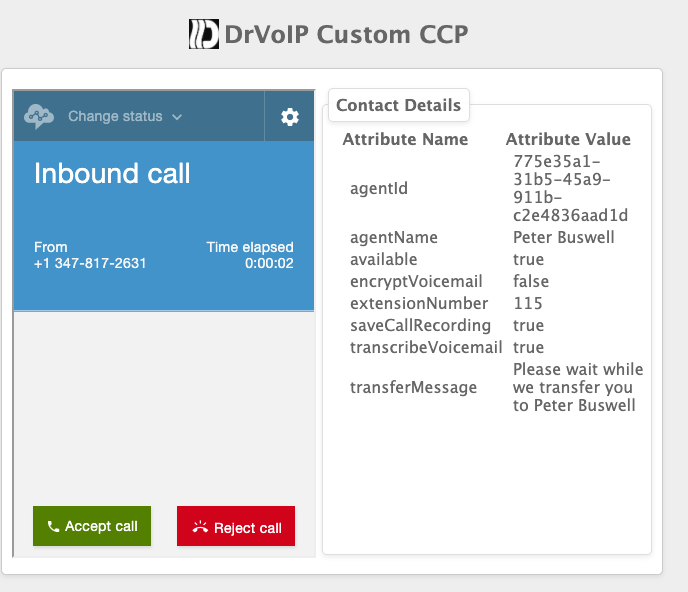
Generally, we want all the information the agent requires to manage the callers experience, immediately available and in a single display.  Most moder systems are Browser based and that interface is basically a WebPage.   In the case of Amazon Connect we can create a simple static website that lives in an Amazon S3 bucket to handle this “marriage”.   Below is an example of a custom CCP softphone for Amazon Connect.   The website hosting this page draws from Amazon Connect and could be configured with a note filed for example.   The Agent would see a lot of information about the caller when the call is presented to the Agent and the note field would enable them to add information about the phone call.  Drop down lists, “disposition codes” and other related document artifacts could be added, all saved and available for further processing.  Even though it has many moving parts, this is the simplest of the integration solutions.

Stepping up the Integration

In the simple integration, we would have a secondary process act on the updated information.  We would create some Lambda functions to note the update and the move the content to the CRM through the API of that platform.   Optionally, we can get more sophisticated and have a much more dynamic and “pretty” user interface.  When we start getting into dynamic websites, we move to a more complex environment than a static S3 bucket can provide.   Most likely we would  have to create a full blown web server, built out on an EC2 instance and you can always spend more money on making the user interface dynamic, flashy and friendly!  That is where a good “front end” developer comes into play.  As a group of  node.js developers we focus on the back end connectivity, but always eager to improve the user interface.

At the end of the day, you have to assign budget to functionality.   Getting a basic working integration between your call center and your business process CRM or internal Intranet datastore is one set of issues.  Stepping up the integration to enable more dynamic, colorful, helpful and friendly user interface is another set of issues.  Lastly, this all has to be maintained as a “living and breathing” entity that requires constant care and feeding.    So make sure you budge for ongoing support!

Summary

AWS has an amazing library of technology and infrastructure solutions that can be harnessed to meet the requirements of anything you can envision.     We welcome the opportunity to guide you through your integration journey!  Give us a call and together we can figure out what is the best strategy to move your enterprise and call center to the next level. – DrVoIP@DrVoIP.com


Amazon Connect “Auto Post Call Customer Survey”?

Most frequently asked Question about Amazon Connect this week!

At a time when we are buried building “work at home” solutions a question has surfaced as being the most asked question of the week!  Can you write a script that provides “after call” customer evaluations?   The challenge with after call surveys is that they need to be automated with no Agent transfer required.  Why would an Agent transfer an obviously unhappy customer to a post call survey?  The only callers the Agent will transfer are callers who are obviously happy with the manner in which the Agent handled the call.   The requirement is that after the Agent hangs up, the customer previously selected for a survey, is automatically transferred to the survey solution!  (Special thanks to Gordon Campbell Dextr.Cloud CSO for bringing this issue to the table)!

Can we automate the after call survey?

The fact is, using Amazon Connect it is very possible to automate the after call survey.   We have created a solution in which some percentage of inbound callers are auto magically transferred to the post call survey dialog.   The solution can be very simple or implemented with more complex options.  In any case the solution will most certainly involve several other services from the AWS pantheon of technology infrastructure solutions:

  1. Clearly you need an Amazon Connect Instance configured with the DrVoIP Post Call Survey script
  2. A decision needs to be made as to how many calls should be transferred to the survey as a percentage of the total call volume.  From 1-100% are possible.
  3. A decision needs to be made as to the customer answer collection technology.  Are we going to use LEX as a Speech Bot to collect the callers survey response, or is a good old “press 0-9” input acceptable?
  4. The actual survey questions have to be scripted and need to map to either a LEX Intent/Slot or a Touch Tone value.
  5. A lambda function(s) will need to be created to write the results to a database.
  6. A database for the results needs to be available to host the responses by caller.  Left to our own design we would make use of DynamoDB but you can make use of any database you prefer.
  7. A report generation and administration resource needs to be created.

As it turns out the automation of the post call survey transfer was solved and we can do this with little modification, if any, to your Amazon Connect existing contact flow scripts.   The above list, however, determines how much time and effort is required to do provide this facility.   In fact, some folks already have a survey solution and the only requirement is to transfer the caller to that solution.    If we have to create a solution then the complexity of the solution is determined by the answers to the questions and decisions posted above.  For example, using LEX is certainly a real possibility with real benefits. Speaking is always better than hunting and pecking a touch tone input device.   Reading and writing to a database is also not that demanding of a task, though it does  take some time to create reusable functions that are not restricted by the number of questions asked.

The Report Generator!

Actually, the last item is the big expense.  You can have a simple and utilitarian GUI interface to setup the survey questions and report the results.  Using S3 and simple static HTML interface works just fine, but is not as fancy as having a GUI with all the latest flashing and dynamically changing “on click” options.

Survey Options

We have been able to randomize the questions asked, which is a nice feature.   Noting if the caller has already taken the survey in a previous call is also doable.  We are always learning new requirements and when we think we have heard them all, someone comes up with another request!    We actually enjoy the “stump the vendor” game, so please do not hesitate to ask us for features that you dream up!   Post Call automated customer surveys  are most certainly within the scope of what you can do with Amazon Connect!  Just give us a call and we can scope it out in no time!  – DrVoIP@DrVoIP.com


Give Amazon Connect Phone system features with “Dial by Name” functionality

Press 1 for…. Why?

It is the 21st Century and there are two technologies that are still in use: Fax and DTMF Call Trees!   Why, I am not sure as there are so many more effective technologies available to replace them.  Why we still have caller “self navigation” by “Press 1 for this and Press 2 for that” is one of the great mysteries of life in the 21st Century  (the other is why are folks still sending faxes)?   I get that Speech Recognition used to be so very expensive that it could not be adopted by but the largest enterprise organizations.  Today however, thanks to services like LEX in the AWS ecosystem, there is no longer any economic deterrent to the rapid adaptation of Speech recognition to the basic IVR based call tree.

Phone System or Call Router?

Amazon Connect is not a phone system in the way that Ring Central or 8X8 is a phone system.  Amazon Connect is a call routing solution with telephony functionality that enables call answering, screening, routing and queuing services to be applied using “rules” and “contact flows”.   You can configure a variety of AWS services to significantly enhance the basic call routing engine to achieve superior functionality within a reliable, resilient and elastic cloud based architecture.  Now instead of saying “Press 1 for this and Press 2 for that” we can say “Hello, tell me how I can route your call”?

Amazon Connect Dial By Name Contact Flow

One of our most popular configurations is a “Dial by Name” functionality that we enable on our LEX based, Speech fired automated attendant.   “Thank you for calling DrVoIP, my name is LEX and I can route your call if you speak the name of a function like sales or support, or say dial by name”.    Now that is a powerful caller experience and significantly functional while providing a memorialized  customer experience that differentiates your enterprise from those companies stuck in the 1980’s with DTMF IVR automated attendants.

Building LEX solutions into your Amazon Connect instance is not that complex though it will require a considerable amount of trial and refinement.  If you want to do a dial by name IVR you will also need to be a competent software engineer and have an understanding of both lambda functions and dynamoDB data structures.  (Better yet, contact DrVoIP and we will do it for you)! LEX will prompt your callers to provide spoken input like someones last name, but you will need a lambda function to take that input and use it to index a database structure.  The database will contain the target information you will transfer your caller to.

Interestingly enough,  you can transfer a call to a phone number or the ARN of a Queue, Contact Flow and Prompt.  This makes it very possible to route calls to individual agents within the contact center or to a service in your call center.  The processes requires:

DynamoDB – Table to hold endpoint contact data

Lambda Function – Interaction between Contact Center and LEX

LEX – Speech recogntion BOT to ask callers who or what they want

The new Contact Flow will greet the caller and prompt them to “speak” the name or function they are calling for.    The Lambda function will take the Intent from LEX and pass it to DynamoDB which will return the endPointID that the caller should be transferred.    Not only does this functionality increase the personalization of the customer experience, it significantly reduces the complexity of constructing contact flows by using a dynamic configuration end point ID.

The DrVoIP.com Youtube Channel has a great deal of material on these subjects including a basic configuration and advanced configuration tutorial updated for 2020.   This site also has training materials.

Contact DrVoIP@DrVoIP.com


Amazon Connect Configuration – Tutorial Video!

Basic Amazon Connect Configuration Guide

If you are interested in learning how to configure Amazon Connect, this guide will walk you through the complete call center configuration!  The guide will be in three parts. Part 1 will cover Basic configuration and has over 1 hour and 30 minutes of instructional content.   You can also download “DrVoIP Amazon Connect Quick Start Contact Flows” that will be used in the tutorial and will also be of assistance in the design of your own call center.

DrVoIP Amazon Connect Quick Start Tutorial Contact Flows

Amazon Connect Advanced Concepts

Part 2  below covers  Advanced configuration options including building a couple of “dialers”,  Lambda functions and DynamoDB database applications.  We will look at contact attributes and  the role they play in apple  integration.  We will also take a look at SSML for text to speech, building a “dial by name” directory.


Part 3 will continue with the Dialer overview and trouble shooting tips.


Amazon Connect – Can Agents log in and out of individual Queues?

Agents in Multiple Queues

One of the more requested features among call center managers is to freely move Agents in and out of customer service queues!   In Amazon Connect, routing profiles associate agents with queues.  If Agent Gandalf DeGrey is a member of the Technical Support team and also a member of the Customer Service team he would most likely belong to a call profile aptly named “TechSupport&CustomerService” (Voice and Chat).

Queue Priority

Call Profiles not only associate the agent with the queues that they engage customers through, but they also enable you to set the priority of each queue.  If Gandalf is able to server both queues and both queues have callers waiting for an Agent, which caller will Gandalf be presented with when he again becomes Available?   The answer to this is based on the priority established in the routing profile for each queue in the profile.   It may be that Gandalf is particularly skilled in the area of Technical Support and it has been determined that he should answer these call request first and only handle customer service calls when the Tech Support queue is empty.   This is handled by configure the routing profile in such a way as to favor technical support callers.

Call Profile or User settings determine Priority?

So do we set the priority based on the user or in the routing profile?   The fact is that the call routing profile determines the priority of calls processed by the users configured in that call profile.  This is a powerful tool that enables a great deal of options in the configuration of call handling goals.   Contact centers are living dynamic  entities that change the level of demand by the hour, the day of the week and external events of the day!  There is not a staff for-casting solution that can cover the impact of the days events on a call center.  For that reason, we need a way to dynamically reconfigure our work force to meet the demands of the day.

Can you move an Agent between Queues?

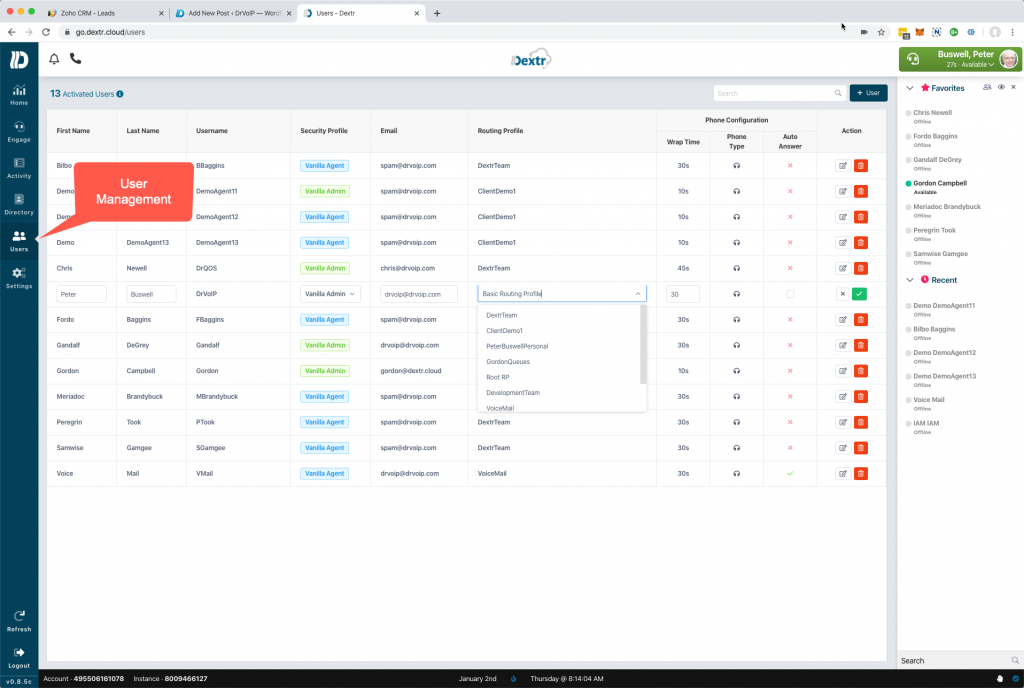
We created the Dextr dashboard feature set to enable options that most call center managers demand.  Being able to move an agent between queues to reconfigure the call center to meet the demands of the day is most certainly an essential management tool!   The Dextr dashboard for Amazon Connect enables you to quickly reconfigure your agent pools easily with a few key strokes by those with the required permissions.    The Dextr dashboard has a user management TAB and enables you to easily move users between queues!

Creating Matching routing profiles

In this example, Gandalf  is in the “TechSupport&CustomerService” (Voice and Chat) profile that enables him to handle calls for both Technical Support and Customer Service.  Events of the day are such that we need Gandalf to service only Technical Support callers.  To enable this, there would be a Technical Support call profile that only serves callers to that queue.  Agents that are assigned to this call profile will be fully dedicated to the Technical Support Queue.

To effect this change, click the User TAB and select the agent management wants to reconfigure.


Then select the the call profile you want to assign that agent to and save your change.


The DexterDashboard enables the call centers most required features available to Contact Center supervisors.   Head over to https://DexterDashboard.com and sign up for a free trial of 15000 minutes of usage.  Try before you buy and pay only for what you use1   Tell them DrVoIP sent you!


Amazon Connect & Dextr now support Chat

Dextr Website Chat Integration

The ability to integrate your Company Website with your call center is a powerful customer experience management tool.  Being able to integrate your website with a ChatBot is even more powerful, but imagine the power of being able to escalate a chat session to a voice call!  Now that is a truly powerful customer engagement strategy and now a standard Amazon Connect Call Center feature.

Features of Amazon Connect Chat

The Chat functionality enables you to reuse the very same contact flows that you established for a voice call or you can create new contact flows that are chat specific.  This significantly reduces the deployment time.  A “Play prompt” step, for example, that would normally be spoken to a caller, is now pushed out as a chat message.   Chats are persistent and given the asynchronous nature of these interactions, responses can be anytime over a 25 hour period.    Let us assume you have a chat session with a client who asks a question about your product or service and the agent asks a follow  up question to clarify the customers enquiry.  Maybe the customer has to go find the answer form another team member and does not reply for an hour.   The Agent might disconnect, but if the customer continues the chat session later, a new session will be created with the entire chat history  and transfered to a new agent.  It is possible also to send the chat back to the same agent, but assuming that agent is no longer available, the entire chat history is made available to a new agent.


The Dextr Dashboard implementation

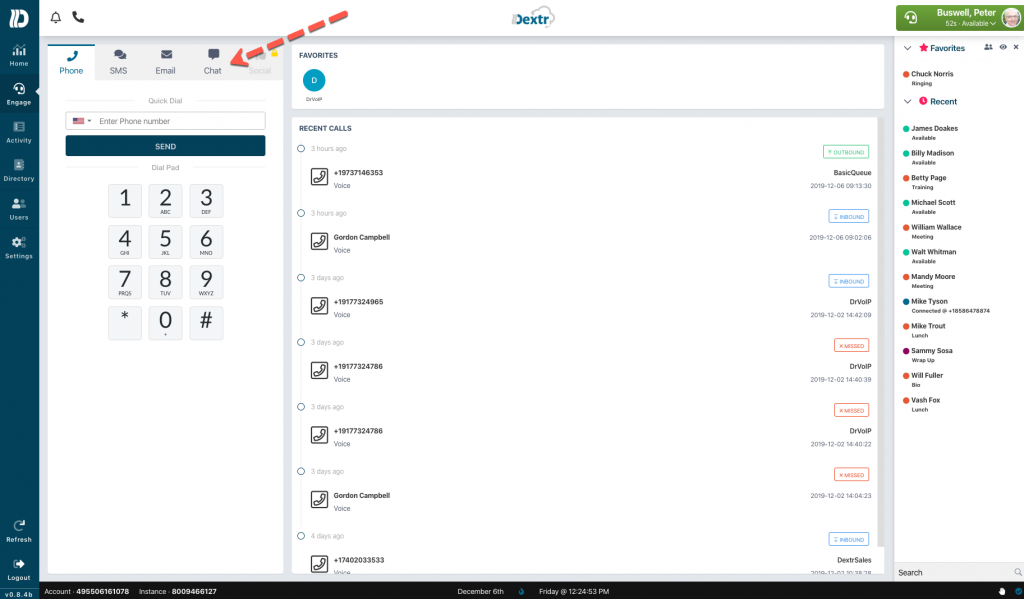
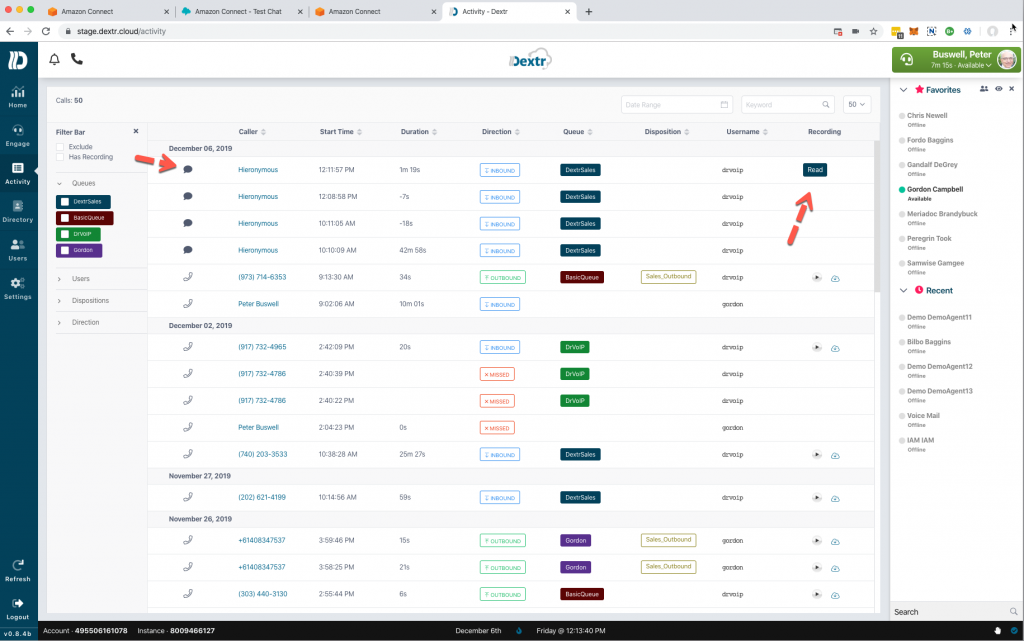
Dextr now includes the Chat engagement option as part of its standard desktop agent offering and the Engage tab now shows Phone, SMS, Email and Chat!   Dextr also adds Chat to its activity screen adding a new icon and a READ button.  The Activity page now notes the chat details including the appropriate metrics.  A supervisor or agent with the proper permissions can also bring back the entire chat history, by hitting the READ button, in a manner similar to how Dextr brings back a recorded phone call!

Dextr is a subscription based portal in which, if you have an existing Amazon Connect call center, you can be driving a Dextr dashboard in less than 15 minutes!   If you don’t have a Dextr dashboard, we will be happy to create one for you!  Ask DrVoIP about our Dextr Contact Center Managed Service Solution in which we provide an  Amazon Connect Call Center for your enterprise, with no money down, no contracts and pay only for what you use!   We take care of everything from deign, through setup, training, “go live”, on going technical support and a Dextr Dashboard for every agent at a nominal per connected minute, exclusive of telephone carrier charges!   DrVoIP@DrVoIP.com


Amazon Connect Deep Call Back Option! – a lesson in Contact Attributes

The Call Back Dilemma !

It is now common place to hear an option while you are on hold in a call center that suggests “If you would like to arrange a call back when an agent is available, press 1 or continue to hold for the next available agent”.    The caller can then enter a phone number, hand up and when an agent becomes available, the system first connects the agent and the places and outbound call to the phone number that requested the call back.  This all works well except when the number entered is the main switch board number at the company that the caller works in.  The receptionist answers the inbound call and says “how can I route your call” and the agent has no clue who in the company requested the call back.

Here is one Solution!

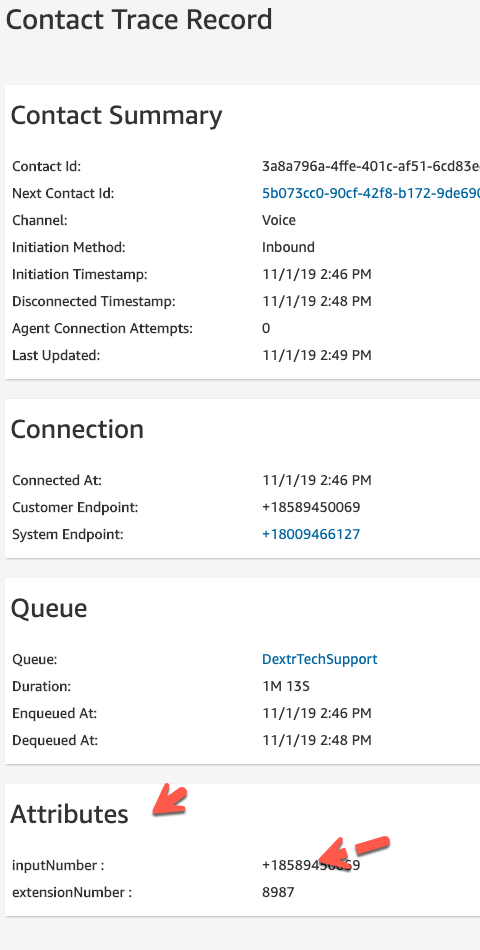
During the call back process, in our contact flows, we ask the caller to enter the number they want us to call them back at.   We read back the number to them and offer them an opportunity to re-enter the phone number if it was incorrectly entered.  We then follow with a prompt that says “if the number you entered was the main number of the company you work for, please enter the phone number of the extension we should ask for when we return your call.  if there is no extension number please press #”.   We store the extension number as a contact attribute which is saved with the contract trace record.  You can even select contact search in the real time metrics of your Amazon Connect dashboard and verify that this attribute is in fact saved with the the contact ID record.

Default Outbound Contact Flow

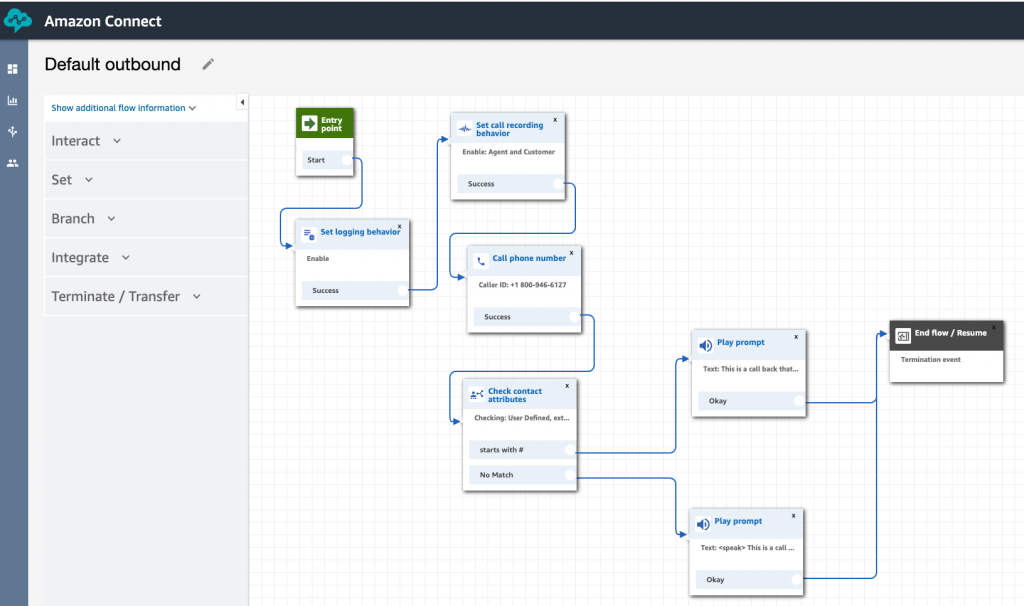
There is a default outbound contact flow in all Amazon Connect instances and you can modify and “save as”  or use it as you desire.  The trick is to create an outbound prompt that plays  a prompt that says “This is a return call from DrVoIP office as requested by someone in your company.  That person is located at <extensionNumber> so please transfer this call to that extension as an agent will now join the conference”.  In this way the receptionist is alerted to how the call should be routed and we have no accomplished what we call “deep call back”.


In this example we check the contact attributes to see if <extension number> starts with # which would indicate there is no extension number. For this reason we want to play a different prompt “this is the call back you request from DrVoIP technical support”.

Options to Improve the experience for the Agent

There is a default Agent Whisper Contact flow that is regularly used in an Amazon Connect call center to let the agent know what Queue Name the caller hit!  Agents who are part of multiple queues find this very helpful.  This contact flow can be modified to play the contact attribute <extension number> when an outbound call is connected.    Optionally, you can present the <extension number> in the agent desktop as a text field.


The configuration of contact attributes in the  Amazon Connect solution is a very powerful tool and can be used to solve a lot of customized challenges!  Give us a call if we can help you set this up! – DrVoIP@DrVoIP.com


Amazon Connect – Is today a Holiday?

Is Today A Holiday?

Having deployed hundreds of CISCO UCCX and ShoreTel ECC and other Contact Centers, checking to see if today is a holiday seemed to be the “minimum daily adult requirement” for contact center management.  In fact one of the most popular scripts on the net for CISCO UCCX was named “HolidayCheck”!    In fact we used this script to provide an XML tutorial  on the DrVoIP YouTube channel.  Checking a list of holidays to deal with periodic contact center closings is usually a standard feature in most call center applications and telephone systems.

Amazon Connect, however, does not provide a “holiday check” out of the box!   If you want one, like many other features in Amazon Connect you are going to have to create it by writing your own function.  The good news is that the wealth of services in AWS makes this a very simple task using nothing more than a Lambda function!

Contact Flow – Invoke Lambda

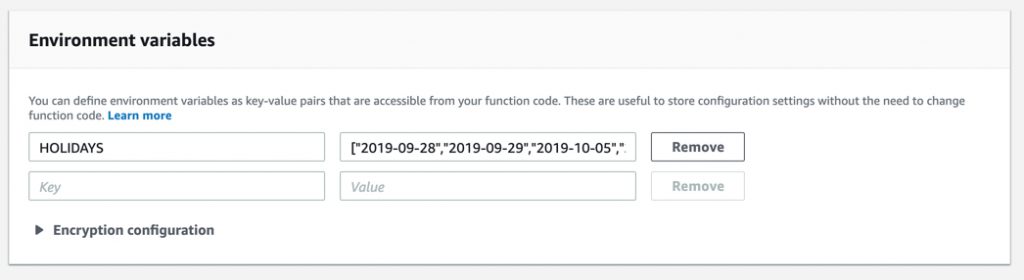
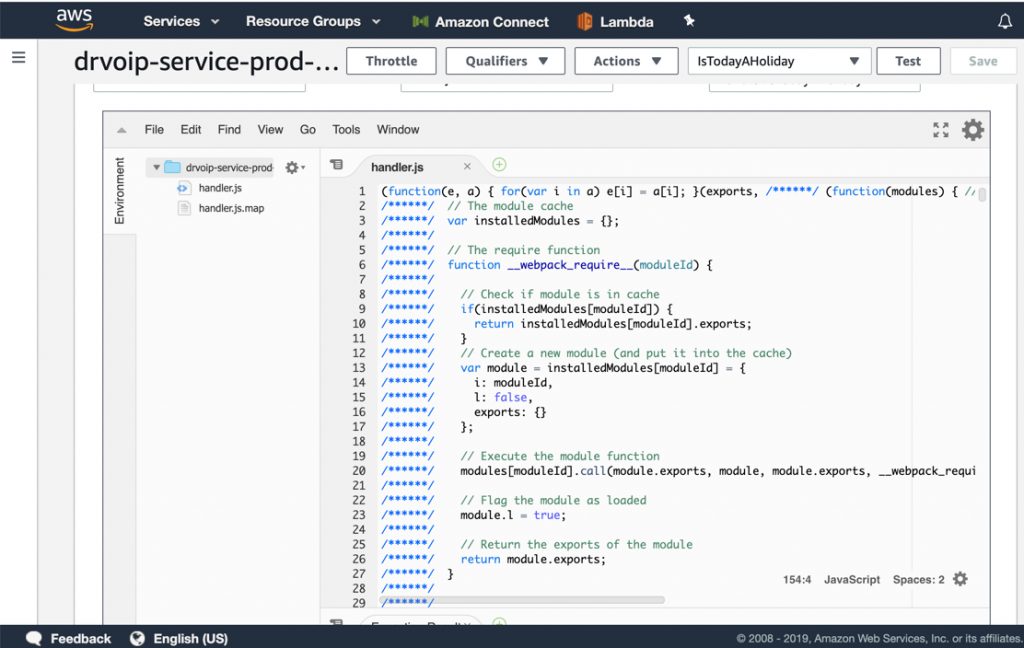
An Amazon Connect contact flow would do the normal “check hours” to figure out if the caller was hitting the system during “on hours” or “off hours”.  If the call arrived during normal business hours, then the next step would be to check and see if today was a holiday.    The contact flow adds a simple “invokeLambda” function to make this determination. To simplify the lambda function, we include the list of holiday’s as an object array within the environmental variables.

We determined to create a simple lambda holiday check function using the fewest lines of Node.js code as possible!  In fact there is no need to invoke the function by passing in a date.  You simply invoke lambda and it uses the javascript date() function to parse through your list of holidays comparing todays date with the individual list items.   What we want returned is a simple “true” if today is in fact a “holiday”; or a “false” if today is not a holiday!  Very simple!   The branch step in your contact flow will be based on this simple boolean value returned from lambda.

Improving the function

Now that we know if “today is a holiday” we have the basics in place.   Improving the function has endless possibilities.  For example:

The basic function assumes a full day closure.  What about half days.

It would also be desirable to have an ability to play a custom audio prompt based on the specific holiday closure.

Clearly you can make the administrative interface much more acceptable to a call center supervisor while eliminating the need to let non-development professionals access the AWS Console.  In the basic function, updating the holiday schedule would require folks be able to access the lambda functions directly to update the environmental variables.    Creating an S3 bucket as a static website host, with a simple HTML interface to enable system administrators to update the holiday list from year to year would be an obvious improvement.   This option would open the door to allowing supervisors to close a queue for a team meeting.

Summary

Amazon Connect is an element of a very large ecosystem in which the available services enable you to create a contact center that can meet your wildest imagination!   If you can “see it”  you can make it happen!  Optionally, you can call on DrVoIP and we will make it happen for you!

The Lambda Function is available here.

The function is written in Node.js and is built out using the Serverless framework which you will need to make use of, to deploy the function in your own Amazon Portal:

First you have to configure an AWS CLI profile in order to deploy here is steps to configure it:
step 1: Open terminal
step 2: Execute command “aws configure –profile <profileName>” it will ask for input key id, access key, and region
Next here is steps to deploy service:
step 1: Open terminal
step 2: Get to project root directory
step 3: Execute command “serverless deploy –aws-profile <profileName>”


Amazon Connect Tips, Tricks and Trouble Shooting!

What no Delete for Contact Flows?

One of the first discoveries you will make while configuring contact flows is that you can NOT delete a contact flow.   Once it is created, you can “save as” but you cannot delete it.  There is a good reason for this and hopefully by the end of this blog it will make sense to you.   Out of the Box, Amazon Connect comes pre-configured with a wide variety of contact flows and system parameters.  You will see this listed as sample and default in a newly created instance.  If you poke around you will also see that a schedule of basic hours has been configured along with a basic queue.  There are preconfigured security profiles and preconfigured routing profiles along with a small library of professionally recorded voice and music  prompts.
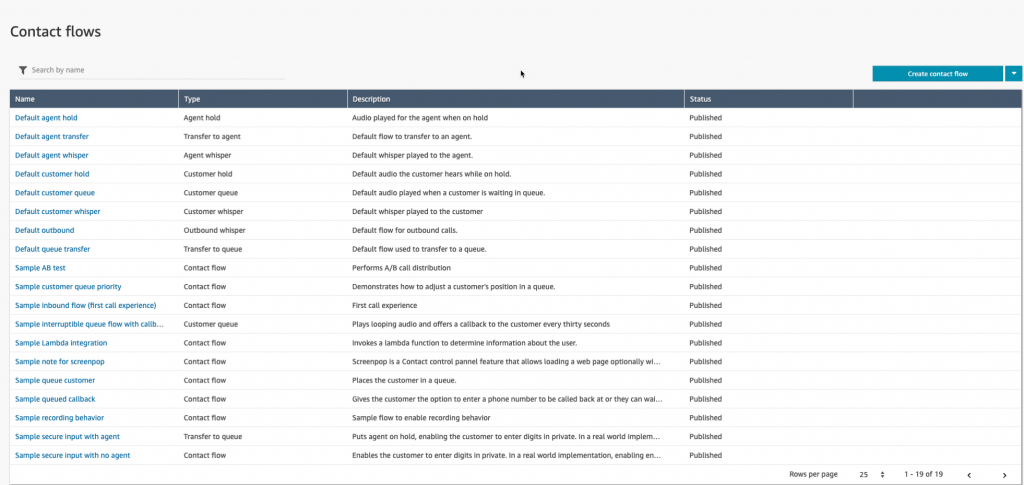

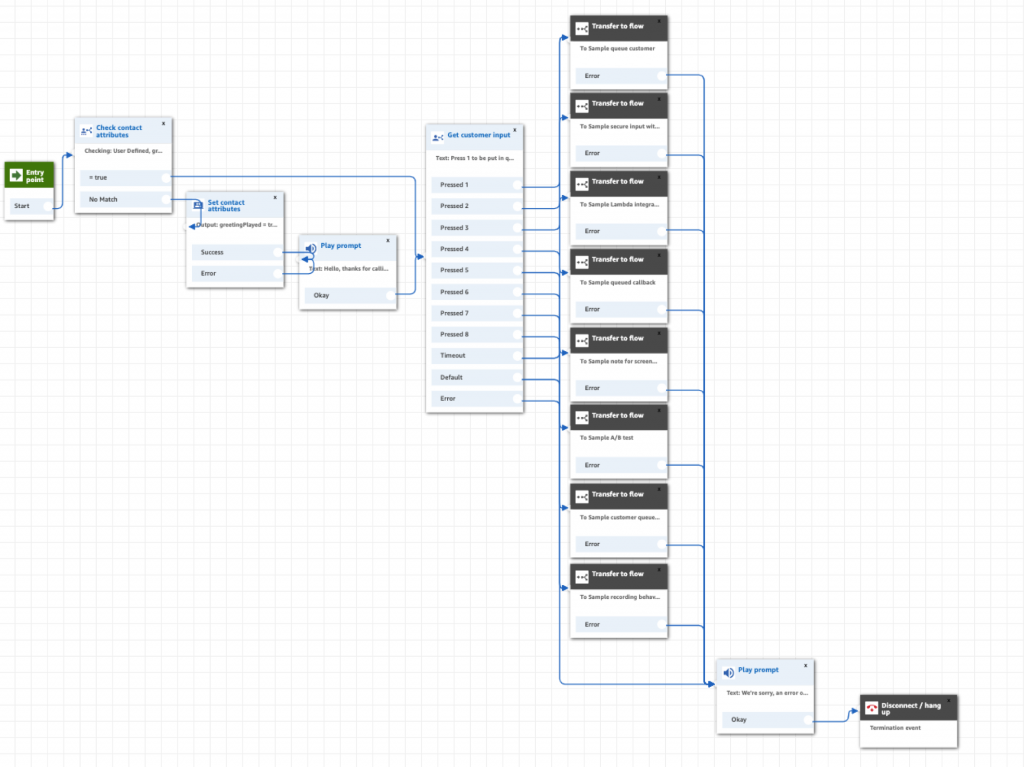
This pre-configuration and population of basic and default parameters is done for a reason that also helps explain why you cannot delete anything after you create it!   Assume you open a new Amazon Connect instance and following the setup menu, add a telephone number.  Assign that number in the drop down window in the phone number configuration to point to the “Sample inbound flow (first call experience”.   Then call the number.  This Call flow will make use of most if not all of the default and sample contact flow listed in a fresh out of the box, unmodified Contact instance.  Since we did not configure an agent or queue it draws on several preconfigured parameters including the “Default Customer Queue” which describes what a caller hears while waiting for an Agent to become available and the “Basic Queue” along with the “Basic Hours”.

How Amazon Connect stages Default Contact Flows

If you open the “Sample inbound flow (first customer experience)”  note that it does NOT make use the “Default customer queue” step.  How is that we hear it if it is not in the contact flow?  When the call is transferred to an Agent we did not even configure yet (we are logged in as the Instance Administrator on a CCP softphone), we even hear the “Default agent whisper”.   Nor did we configure a Queue?  Likewise if we put the caller on hold we are tapping the “Default customer hold” contact flow.  If we are in Call Wrap up, the caller would be hearing the “Default customer queue” contact flow while awaiting for an agent to become available.

This is the key reason you can not delete anything!  To do so would jeopardize the stability of the Connect Instance.  These defaults assure that configuration newbies cannot stray materially from the experience they intended to configure.   While the Connect instance is setting up an outbound connection to the agent CCP softphone, and even longer if dialing an agent’s hard phone.   The caller will hear the “Default customer queue” experience.  We recommend that you get a “ring back” audio prompt and use that in either the default customer queue or the customer queue you create.  We think it is a bit confusing for a caller to call in and hear music while being transferred.  You should also note the possible impact on your inbound call statistics.   Additionally, note that billing started the moment your caller hit the phone number regardless of the fact that they are not yet connected to an agent.
Creating and Modifying Contact Flows using “Save As”

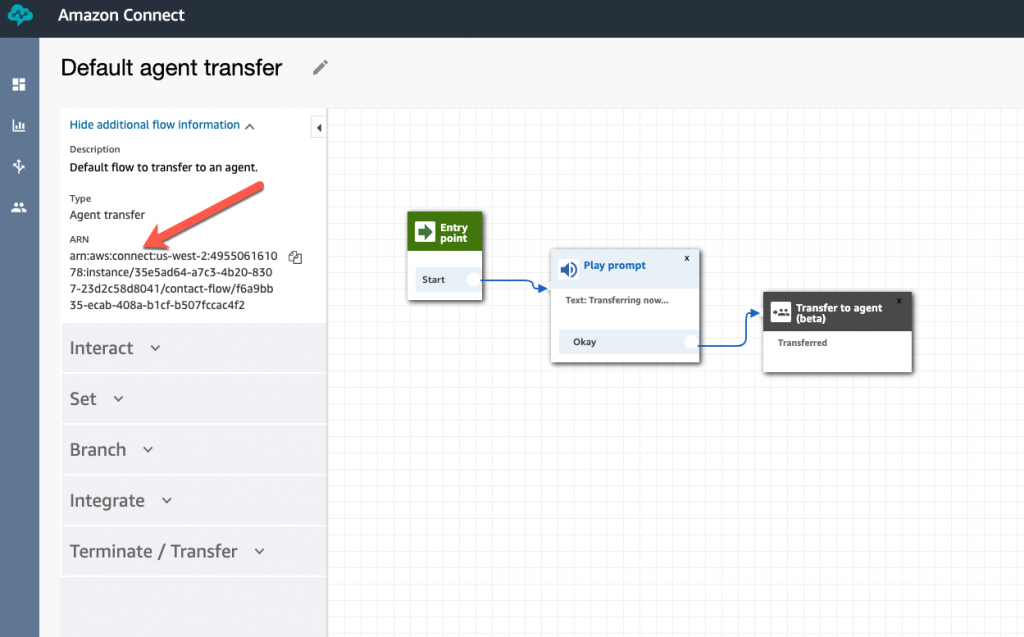
Each of the Contact flows in an Amazon Connect instance has an Amazon Resource Number or ARN. This is a globally unique identification number and defines every contact flow in the instance.  Generally, you will build a new contact flow from an existing one.  To do this, you first open the contact flow you want to copy and do a save as.    You have to pay attention here, or you will have a big problem!   Some folks open a contact flow,  change the name and make some modifications and then publish it!  It will show up in your list of contact flows, but it will still have the ARN of the original contact flow even though you renamed it!   This means that other contact flows that call on that original contact flow will now get all your changes!   What you want to do is rename the contact flow and do a “save as” in this way you create a new ARN and will not be over writing the original contact flow.
 

Not all Contact flows have all contact flow Options?

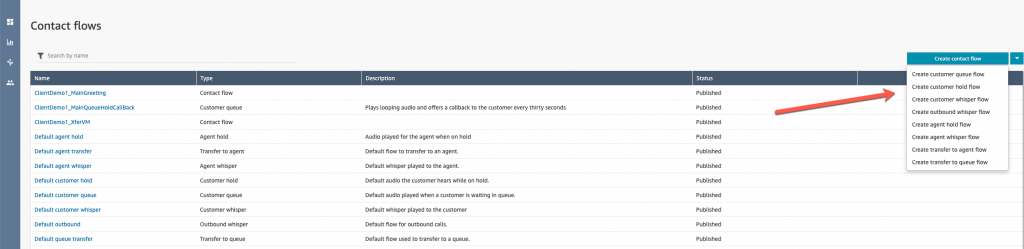
There are about 9 different types of contact flows that you can create to meet your call flow requirements.  If you create a new Contact Flow you need to understand that not all contact flow types will have all the contact flow options.  For example if you are describing the experience you want a customer to have while in queue waiting for an agent to become available, you will  open the “Default Customer Queue ” and do a “save as” to create your experience.   Do not expect to find a “Transfer to Flow” option in the list of possible steps as that option is not available in this type of contact flow.  The list of step options changes based on the type of contact flow you are creating, so keep this in mind!
 

Error Handling

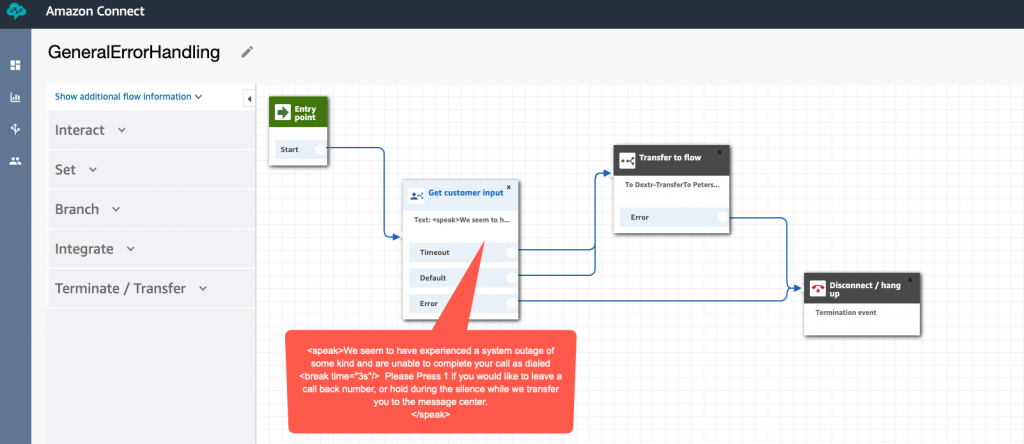
Generally, every step in a Contact Flow has an error exit.   We have found that it is best to create a Contact Flow named “error handling” and to use this as the solution to all of the options that you must provide an error exit.
 

Use Speech Markup Language for Text to Speech prompts!
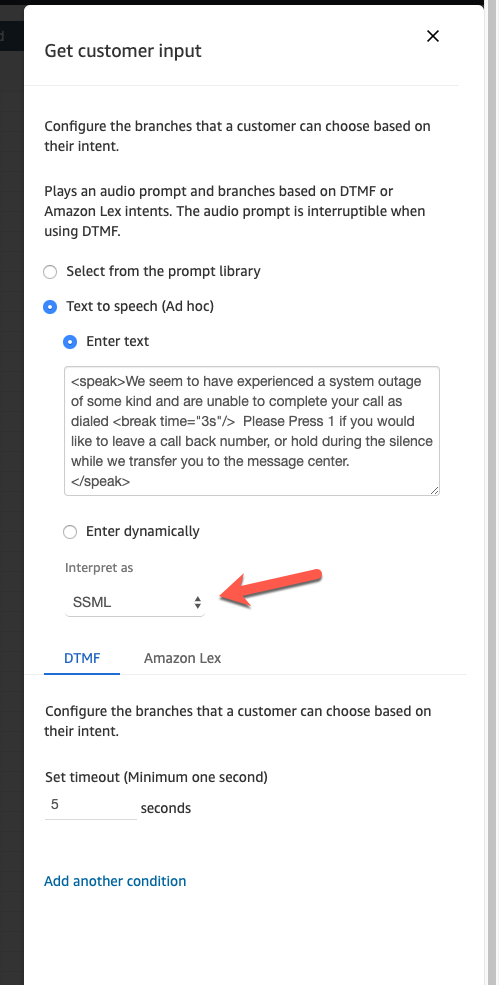
As a consultant deploying call center and IVR solutions, one of the most frustrating aspects of the implementation is waiting for clients to get their voice prompts together!   Generally we will not start an implementation until we have the prompts!  Text to Speech is a life saver for deployment engineers.  You can create prompts on the fly and let people test them, suggest modifications and really fine tune the prompts to achieve the desired level of customer care.   When the prompts are all agreed to, you can then get them professionally voiced or not!  We find that Amazon Polly is an excellent option for prompts but we also suggest that you use the Speech Synthesis Markup Language option.  In all of the prompt areas you can choose between loading a Wave file, or using Text to Speech. When using Text to Speech you have the option of interpreting the text as text or as SSML.     SSML enables you to add tags that can control the various components of speech including tone, pitch, speed and format.   You may want a number read as a phone number for example, rather than a long integer.   SSML is simple to configure and it very powerful.  Learn to use it always and you will have very excellent results.

Don’t forget to assign outbound phone numbers to your Queues

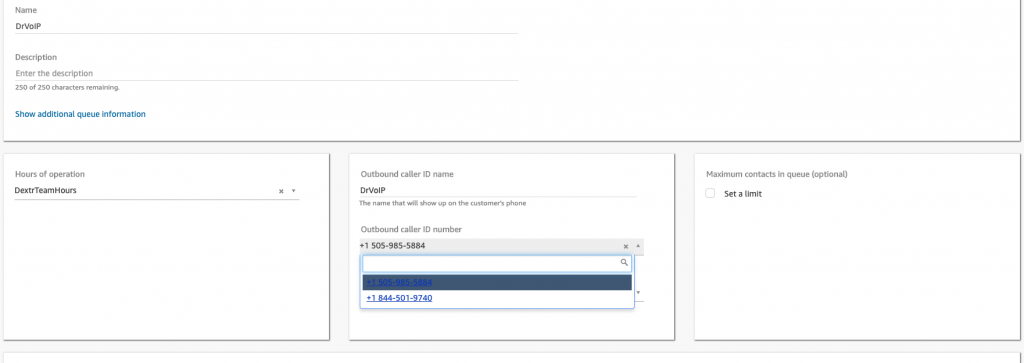
In Queues in which Agents are expected to make out bound calls you must associate a phone number to that queue for outbound dialing.  The Agent will not be allowed to make outbound calls if they do not have a phone number assigned to the queue.  You can also try to put an outbound name in the same configuration area, but there is no guarantee that this name will be displayed to the CallED party.  The phone number will most likely display to the CallED party, however names are provided by multiple options at both the carrier level and the end device level.
Trouble Shooting 101

When trouble shooting Amazon Connect contact flows your best friend is CloudWatch and Contact Flow Filters!   Lets take a look at each of these tools to better understand how they work together to provide a history of how a specific call behaves.    First while in the Connect dashboard you will find under “Metrics and Quality” you will find a  TAB for “Contact Search” .  Selecting this option will enable you to set search filters for the contact record you are trouble shooting.  You can filter on the usual date and time parameters, but also by queue, and by call type and direction (Inbound, Outbound, Transfer, API, Call Back and Queue Transfer).   The goal is to obtain the “ContactId” the key to all activity in the Connect Instance.  If you know this ContactId you can just search for it and skip the filters.  Optionally you can just “Search” and you will see a list of ContactId’ based on the default filter.
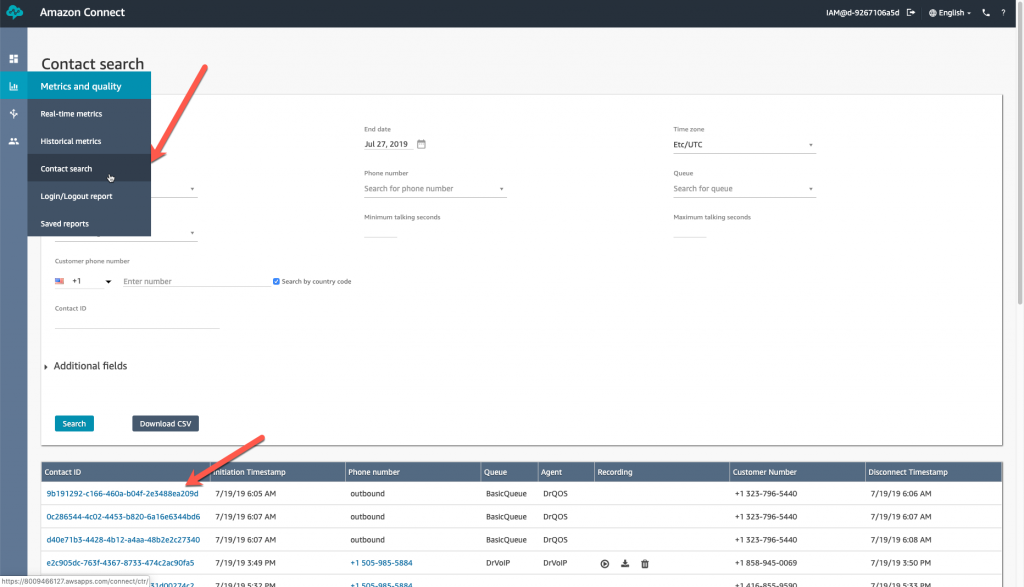
Now that you have the Contact ID you can move over to CloudWatch (this assumes you have enabled logging) and you can search for this ContactId record and follow the entire call flow from start to finish,  Go to the CloudWatch service, click on Logs and then locate the “Log group” for your Amazon Connect Instance.  This will pop a list of “Log streams” and “last event time”.  Find a row that closely matches the date and time of your target ContactID and open that log stream by clicking on it.

Note that the time in the even stream is in UTC and matching log times is always interesting.  In this example we searched for a particular Contact ID in the Connect dashboard and it shows that the call we are interested in had a “Initiation TimeStamp” of *7:46 PM”  GMT/UTC  or Zulu  time (if you are military, which all mean the same time reference regardless of where you are located on the globe).

 

The Contact ID is a clickable link, and will bring up some information of interest as contained in the Contact Trace Record.  There will be a Contact Summary, A recording if enabled with the location of the recording and a playback button, Connection Endpoint pairing and Queue information.
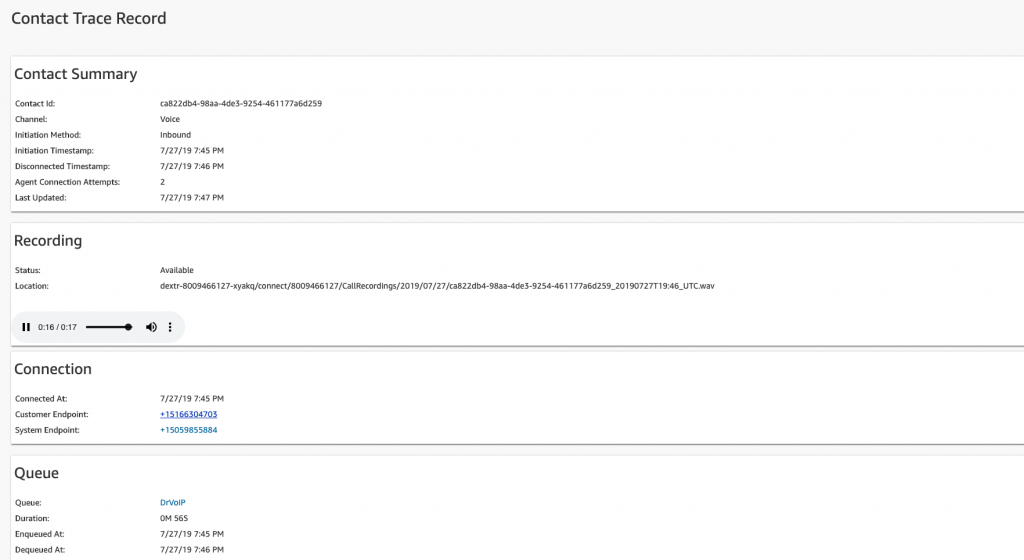
Heading over to CloudWatch and checking the respective Log Stream in the instance log group, we find that the time is being adjusted to the GMT offset of the time zone the Instance time reference, which in our case is GMT -7 hours!  S o the Contact Filter Search in the Amazon Connect dashboard is being Time Stamped for GMT/UTC but the log is offset (Terminate at 7:46 PM in dashboard is listed at 12:48 in the CloudWatch logs).   Keeping track of this time offset will drive you a bit nuts, but if you are aware of it, you can figure it out.  SUMMARY – Look in Cloudwatch for the UTC offset in your Connect Instance and NOT the time stamped in the Contact Filter of your Amazon Connect dashboard!



When searching for records in the CloudWatch logs you will note that you can set it for ROWS or TEXT and you can also select to search by specific times and choose between UTC time or Local Time zone>
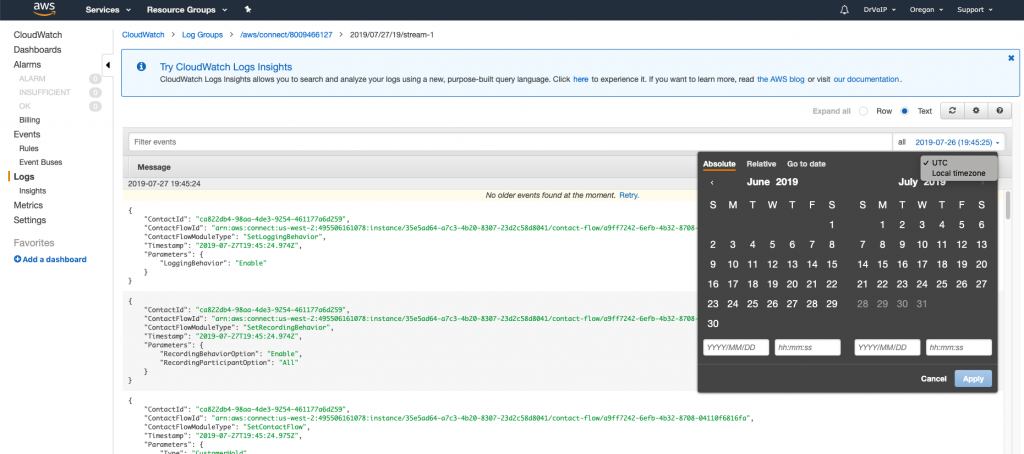
When you set your search by ROW you will get an orderly list of multiple Contact ID’s within the event range reported.  Logs are posted about every minute or so.  In an instance with a heavy call flow you are going to find many different Contact ID’s in that event range and will have to search for a specific record using a search filter in the format of “ContactId” = “ca822db4-98aa-4de3-9254-461177a6d259”.   In Text mode you can also search using the CTRL F feature of your browser.

When you use the ROW mode you will get a list of Contact Flow steps that, by pushing the down arrow will open each step for inspection.  This is necessary to see each step of your call flow, what Contact FlowId  was used by ARN.
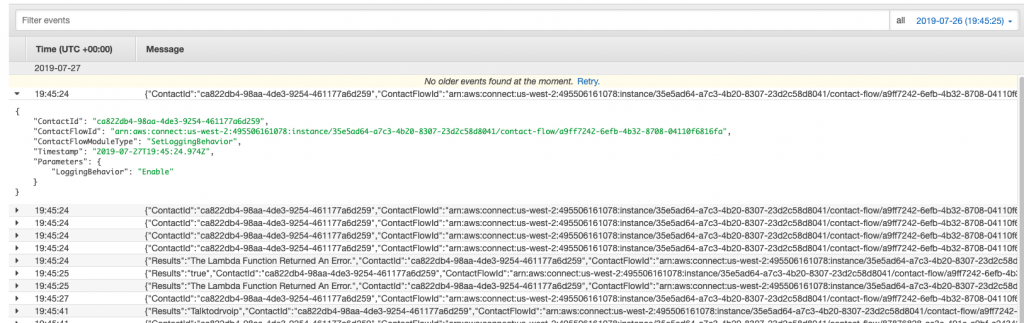
Selecting the TEXT mode will generate the same list of JSON objects but they will be fully expanded:
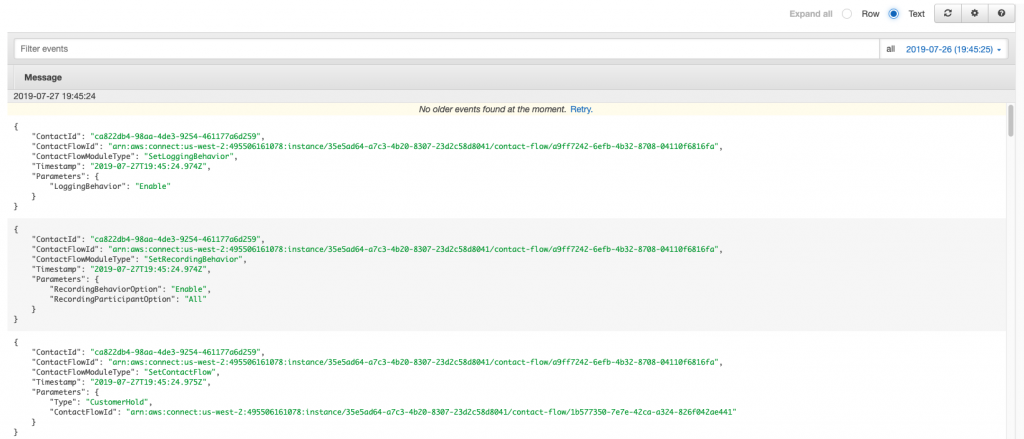
CCP Trouble Shooting

There is a very useful tool for testing the connectivity of a specific desktop call control (CCP) to your Amazon Connect instance.  It provides useful information about the latency, resource, reachability and connectivity that are essential base lines for trouble shooting.   Click here!
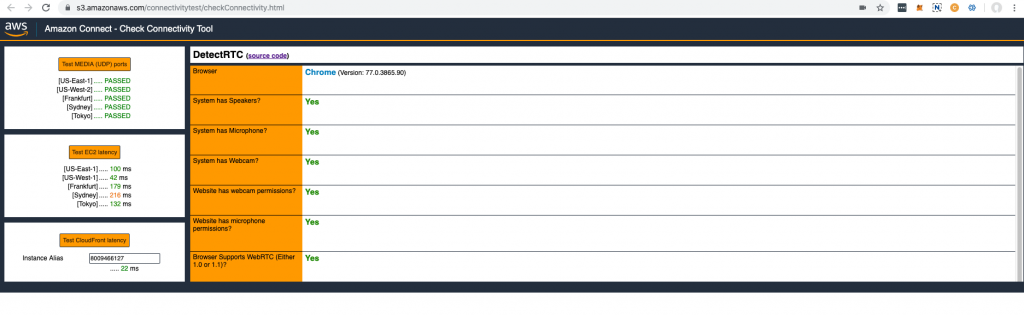
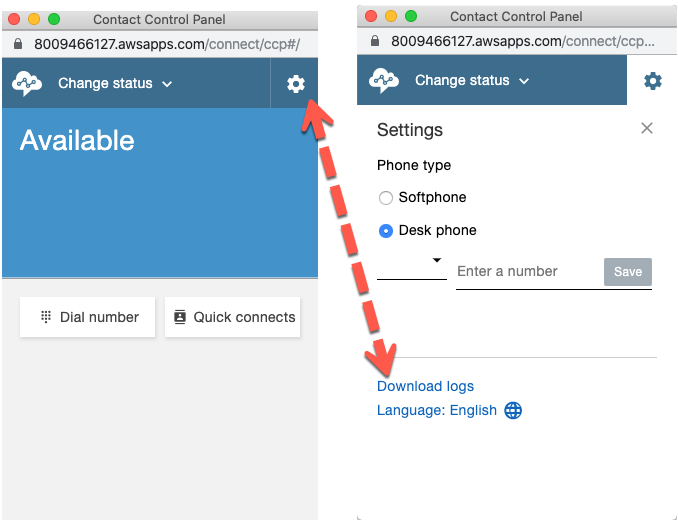
CCP LOGS

On the CCP you will find the little GEAR symbol and if you click on that you will be able to download the logs for this Agent Desktop.
 

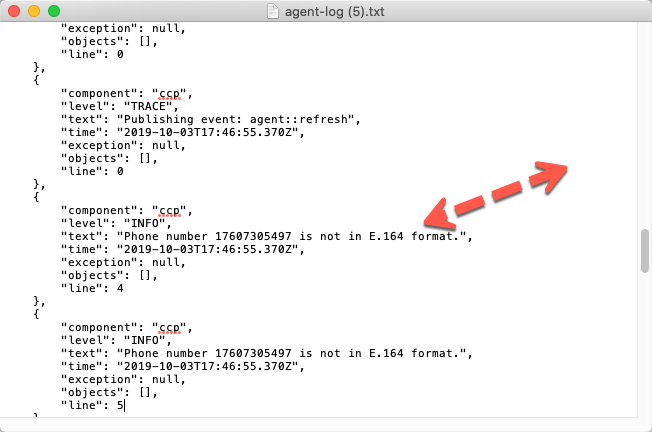
You can open the logs with any text editor and the content often spells out the issue pronto quick!
 

(to be continued)

 

Enhance your ShoreTel ECC with Speech Recognition & Chat Bots!

Press 1 for English!

Two characteristics of telecom technology in the 21st century continue to not make sense to us.  Why are we still using fax?  How come we still “Press 1 for this and Press 2 for that”?   I mean really, it is the 21st century after all.   Let’s put fax aside for the moment and focus on the continued use of DTMF key presses in interactive voice response solutions like automated attendants and embedded applications, like bank account balance enquiries.   You would think in this age of AI and Chatbots, you would no longer need to “Press 1 for English”.   The application should be “smart” enough to to know what language you speaking!


ShoreTel ECC

The Shoretel ECC was originally designed and built by a team of engineers led by Avi Silber, former VP of Engineering for Tadiran, who left to form Easy Run a new brand of call center.   Easy Run would ultimately enter into OEM deals with 3COM (remember the NBX?) and later ShoreTel.  We had been working with the ShoreTel ECC since the Easy Run days and considered it one of the best small to medium call center solutions in the market.  We still love it, but it has not had a major feature enhancement in years!  In a call center world dominated by omni-channel solutions, this lack of new functionality, in our humble opinion, seems to be the end of the road for this product.  (As an aside, Avi is now back at Tadiran and the company has acquired the Easy Run code).

Click2WebChat

For most of the last decade a primary revenue source for DrVoIP was the ongoing support of ShoreTel ECC contact centers.   We think we have installed and maintain more ECC call centers than any other vendor on the planet.  Clients would regularly make requests to enhance ECC.  A common request for example, was to enable SMS or TEXT messages to be routed to the next available agent.  We would code the solution and satisfy that client only to repeat that exercise the next time someone asked for that solution.   For this reason, we determined to productize the solution and created Click2WebChat which brought Text, Video, Chat and Web sharing into the ShoreTel ECC arena.

ShoreTel Speech Recognition IVR?

There is no reason for ShoreTel ECC to be without speech recognition, natural language processing or chat bot technology.  We now regularly front end ShoreTel ECC with AI bots that eliminate the need to “Press 1 for anything”.    You can place a call into a ShoreTel ECC and have a much richer customer experience by offering a natural language interface.   Imagine calling an ECC and having it answer “welcome to the customer support line, how can I route our call”.   Speech Recognition is clearly a more effective solution that rattling off a long list of possible options that the caller can self navigate with a good memory for lists and a touch tone dial pad.  We have been designing and building AI bots that work with ShoreTel ECC and make life a lot easier for both ends of the call center phone conversation.  It is good for the customer and good for the Agent, shaving valuable minutes off each phone call to your ECC.

ShoreTel Chat Bots?

If you look at the content of phone calls to your contact center, you will notice that some large percentage of your customer requests are for the same reasons.   Most call centers have already learned to create a Frequently Asked Questions (i.e. FAQ) database for use by the agents.   The agents do not have to be subject matter experts to answer questions, they just need access to the FAQ database.   Now, what would happen if that database was at the end of a Natural Language processing speech recognition bot that could handle that entire customer interaction without requiring a agent at all?   It is not going to eliminate agents, but it will shift the work load such that agents are used to handle the percentage of your customer requests that are outside the FAQ database.   This is where Chat Bots come in and do an excellent job 24X7, without vacations, holidays, sick days or breaks!

Long ago, we had a company Cobotyx that made “robot receptionists” or COBOTS.  We learned that saying you were replacing low pay receptionists with a low cost machine, was not very smart.   We borrowed an expression from the cybernetics thinker Dr. Norbert Wiener in his 1950 publication “The Human Use of Human Beings” and learned that we are not here to replace humans; we are here to free humans to do the things that only humans can do.

So, if you are considering updating your ShoreTel ECC to add any of this functionality, give us a call and learn just how easy and cost effective this technology can actually be.  – DrVoIP@DrVoIP.com