
In a VoIP environment the WAN circuit is generally engineered to handle X phone calls of a specific codec. For example you might plan out a circuit that supports 10 simultaneous phone calls across the WAN between sites. You select the G711 codec and plan each phone call at 82KPS per call. This would require that there be a minimum of 820KB of bandwidth available or approximately 55% of a full T span. Given that the WAN connection also supports data applications, we want to assure that Voice does not take all available bandwidth! Interestingly when people complain about the bad quality of a VoIP call, it is generally the result of exceeding a bandwidth limitation, If you engineered the circuit for 10 calls, when the 11th call is placed, not just that phone call is trashed, but all 11 phone calls are destroyed! For this reason VoIP systems in general and ShoreTel in particular have strategies for limiting the number of calls across the WAN. In ShoreTel there is a parameter entitled “Admission Control Bandwidth” located in the Sites definition in the ShorewareDirector administrative web portal. This parameter assures that a call will not be set up between this site and another site, if that phone call would exceed the bandwidth setting. This generally eliminates the 11th phone call on a circuit designed for 10 simultaneous phone calls! ShoreTel switches or media gateways, know about the bandwidth they would consume when setting up a phone call and can take action based on this ACB parameter. We need to apply solid WAN engineering practices to the circuit planning however, as the ShoreTel switches will not know if that bandwidth is actually available! So it is possible that the ABC parameter will allow a call to be setup, but bandwidth may not actually be available as other data applications might be consuming more than planned bandwidth at that point in time. For this reason, we need to prioritize voice and data with queuing strategies in our WAN routers, the subject of yet another blog!
Category: Voip Service & Solutions
Is the Economy good for VoIP?
Has the economy hit VoIP? My thinking is that it has and in a very positive way for both integrators and voip service providers. Throughout my career I have always been amazed at the number of traditional key telephone systems sold into the small business segment of the telephone equipment market place. If you added up the numbers as published by the publically reporting companies in this segment, extrapolated an average SBE equipment size requirement you would conclude that every man, woman and child in this country already owns a telephone system! So where do all the new SBE phone system come from? Having said that, this number is getting harder to calculate as the companies that you could track in this segment (e.g.. Vodavi, Comdial, etc) have morphed into something else and generally as a direct result of the increasing acceptance of VoIP in that market segment (e.g. Covad, Packet8, Vonage et. Al). The economy even when it contracts, causes companies that survive to change their shape and size. We have witnessed a growing demand for companies seeking to spin off a branch office as a standalone business. If you have a CISCO Call Manager, for example, and you were running SRST at the branch office, we are servicing requests to convert the branch to a standalone CCME. Business Partnerships dissolve, the partners create new entities and split a perfectly good ShoreTel IPBX in two! Service providers in general, seem to be showing increases in VoIP revenue segments, specifically in the SIP environment. Cbeyond (CBEY) seems to be trading at near its 52 week high. Generally, my thinking is that VoIP is a good place to be no matter which way the economy moves!
760 Area Code Change to 442 – San Diego
760 AREA CODE
Who Will be Affected? All customers with a 760 number will have to change the way they dial. The new 442 area code will serve new customers in the same geographic region as the current 760 area code, which extends from Bridgeport in the north, south to the Mexican border, Camp Pendleton on the west, and east to the state line.
What Will be the New Dialing Procedure? To complete calls from a landline phone, the new dialing procedure requires callers to dial 1 + area code + telephone number. This means that all calls in the 760 area code that are currently dialed with seven digits will need to be dialed using 1+ area code + telephone number.
When Will the Change Begin? Beginning May 2, 2009 … you should begin using the new dialing procedure whenever you place a call from the 760 area code. If you forget and use the old dialing procedure of dialing just seven digits, your call will still be completed.
Beginning October 24, 2009 … you must use the new dialing procedure for all calls. If you do not use the new dialing procedure, your call will not be completed, and a recording will instruct you to hang up and dial again.
Beginning November 21, 2009… new telephone lines or services may be assigned numbers with the 442 area code.
What Will You Need to Do? In addition to changing your dialing procedure, all services, automatic dialing equipment, or other types of equipment that are programmed with a 7-digit telephone number will need to be reprogrammed to use the new dialing procedure. Some examples are life safety systems, fax machines, Internet dial-up numbers, alarm and security systems, gates, speed dialers, mobile phone contact lists, call forwarding settings, voicemail services, and similar functions. Be sure to check your business stationery, advertising materials, personal checks, and your personal or pet ID tags to ensure the area code is included.
What Will Remain the Same?
· Your telephone number, including current area code, will not change.
· What is a local call now will remain a local call regardless of the number of digits dialed.
· The price of a call, coverage area, or other rates and services will not change due to the overlay.
· You can still dial just three digits to reach 911, as well as 211, 311, 411, 511, 611, 711 and 811.
Who May You Contact with Questions?
contact support@drvoip.com for assistance in programming any changes to your ShoreTel phone system!
SIP Softphone on Asterisk, CISCO and ShoreTel
Configuring SIP extensions has become one of the most requested support questions we receive. Asterisk, CISCO and ShoreTel all support SIP extensions. Candidly, SIP is an excellent protocol and one that most IT professionals are already familiar with. This is an application level protocol and looks an awful lot like HTTP etc. Ever go to a webpage and get a 404 error, “page not available”? Well SIP error messages are very similar. If you get a 404 SIP error message, it means phone not available. Though H323 and MGCP are certainly more mature protocols, they are most useful for “call processing”. SIP has the added dimension of being useful for presence information. Setting up SIP extensions on ShoreTel is a breeze and we have setup up everything from CISCO through Polycom desk phones and a handful of wireless handsets as well. ( I am working on getting my iphone connected to ShoreTel using a wireless SIP phone and I am breathlessly awaiting the release of 3.0). X-Lite makes a great SIP softphone on ShoreTel and I have included a soundless SIP configuration video for those of you familiar with ShoreTel administration. This configuration is built using cally the same in 8.1 so enjoy!Version 9 of ShoreTel, but it is basically the same in 8.1 so enjoy!
VoIP and Microsoft Outlook Integration?
Does your Microsoft Outlook Integrate with your phone system? This functionality is getting to be the “minimum daily adult requirement” feature in the VoIP vendor space. We all just expect that our phone system “knows” about our “contacts”. We don’t dial phone numbers anymore! We enter Names and the phones system gets the number out of our contact list and places the call. Often, an incoming phone call to our desktop, will cause our contact information to be displayed. Some integrations enable your phone system to change user profiles and call handling modes based on your Outlook contact. Of late I have been wondering how far this integration can go? I mean, if I have a conference call scheduled in my Microsoft Outlook, shouldn’t the phone system know about that? My thinking is the phone system should just call me and remind me of the conference and then ask me to approve joining the meeting!
ShoreTel Contact Center – Integrated Agent Tool Bar
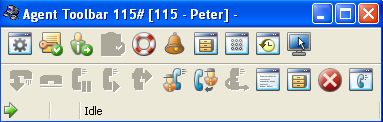
The ShoreTel Contact Center provides two strategies for call management at the desktop. We have found that the basic ‘agent tool bar’ is an excellent solution for call center desktops in which different shifts sit at the same desk, use the same computer and phone. It is easy enough to program the tool bar to prompt the agent for there log-in information. In this way, you can set up your phones with extension numbers that multiple agents can use. When an agent reports to work, they go to their assigned desk and log-in, using an extension that might have been used by a different Agent on the previous shift. The ShoreTel Contact Center keeps track of what agent used what extension during what time slot. On desks that are dedicated to an individual agent, the agent tool bar can be integrated into the ShoreTel Personal Call Manager. The Personal Call Manager looks like a Workgroup Agent call manager, but the tool bar indicates “contact center” and the drop down list contains information that is appropriate to the ShoreTel Contact Center or Enterprise Contact Center. There is one additional advantage of the stand alone Agent Tool bar. You can push custom parameters, named “call profiles” in ShoreTel documentation, to the Agent Tool bar. We find that you do not have the same flexibility with the Integrated Tool Bar inside the ShoreTel Personal Call Manager.
Call Center Design
It is very normal to start planning a call center around the concept of DNIS, Groups, Agents and Skills. Experience has taught us, however, that call center design needs to start with a more important concept. Call Centers are performance oriented. We measure the number of calls presented, the number calls answered, the number of calls abandoned, average talk time, the average time a caller is waiting in queue for service and any number of other key parameters. We want to know call disposition, agent availability and how much time was used for lunch and breaks. Is the staff sized appropriately for the volume of calls that are arriving? Do we over flow excess call volume from one group to another group? How often do we do this and how long did callers waiting in the original queue before this happened? Do we Interflow from one call center to another? These parameters are all key characteristics of a call center and the very parameters we want to measure. For this reason, call center design should begin with the actual report that we want call center to produce in order to verify our performance! Lets construct the report we want to use to manage our business and from this document, we can best work backwards to creating the groups, agents, skills and Queue messages.
ShoreTel Location Based Services
At first I had to think about why I would want LBS on my ShoreTel Mobile Call Manager? After all, it already alows me to change my call handling modes, access my voice mail and see my call history. I can assign my cell phone as my “external assignment” and go seat on the beach while managing all of my office phone calls as if I was sitting at my desk. So what do I need Location Based Services for? With ShoreTel Version 9 the GPS in my phone can use my current location to set my call handling mode and effectively change my external assignment. So when I am in the office, all the calls to my extension ring in at my desk. If I go out for lunch the GPS notes my location as “not in the office” changes my external assignement and my calls start rining in on my cell. When I finally get home from a long day at the beach, the GPS notes that I am home and assigns my extension to my home phone. Now that may not be the definition of fixed mobile convergence, but it works for me!
Priority Call Management?
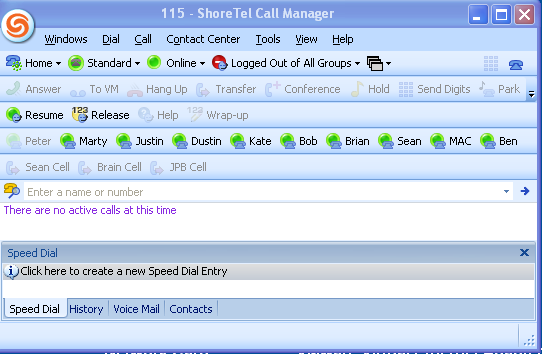
Are all your customers equal? Every business owner, large or small knows the answer to that question and the answer is no! We have Platinum, Gold, Silver and Bronze customers, each of which represents a different value to the business. For this reason, we often want to structure our call flow to prioritize these customers. You do not have to work in a “call center” to manage this priority scheme. The ShoreTel Personal Call Manager, for example, provides a visual call management tool that enables you to apply the concept of “priority call management”. I know the value of my current telephone conversation. It is the value of the next phone call that I want to be alert for. We have all had the experience of being on the phone talking and suddenly seeing the messaging waiting light illuminate on our phone! You immediately know that the very phone call you had been waiting for, slipped right past your ear and into the voice mail. With a personal call manager, I can see the next phone call as it arrives and take appropriate action. I can ask the current caller to hold. I have my ShoreTel Call Manager set so that a second important call to my desk can be sent to a greeting that says “Hi, I see you ringing in and if you hold the line, I will wrap up the call I am on and be right with you”. (Send me an email and I will share how I set that up). Optionally, I could have put the first call on hold and taken the second, higher priority caller. The issue is simply: when the financial, time or relationship value of the next call is more important, you will truly value having a visual, personal priority call manager only a click away!
VoIP System Design – Call Flow
Installing a VoIP solution has a wide range of technical issues that need to be addressed, organized and accounted for. From co-coordinating the “porting” of phone numbers from the old telephone carrier to the new carrier; to determining who has responsibility for providing DHCP and Time services to the new phone devices the technical detail is an endless check list. Generally, we always manage to get all of the technical details correctly identified and successfully implemented. The speeds and feeds all seem to work out and the phones come alive with dial tone and PSTN connectivity. The area that we as a professional service organization are always trying to improve, however, is the very important subject of call flow. Exactly what will an incoming caller to your place of business experience? Will there be a live answering point or will an automated attendant be used? How will calls be handled if the intended call processing solution, either the person or the automated solution is unavailable? Are calls received after normal business hours handled differently? If so how? What about holidays? Unfortunately, though the technical details of a new install are generally always successfully negotiated in time for the “go live”, the entire subject of “call flow” is often neglected until post cut over! Personally, I have found this area of a new installation to be the most demanding and least understood aspect of system design. If there is any area of a new system implementation that needs attention this would be it. The scripting of automated attendant and workgroup, contact center queues needs to be carefully crafted. Time needs to be allocated to the recording of these scripts and both on –hours and off-hour call flow testing needs to be accomplished. After all, the creation of a positive, effective and efficient call flow experience for your client base is what the telephone system is suppose to accomplish in the first place!